HowTo: Hack Wireless Internet

HowTo: Hack Wireless Internet
Tinkernut demonstrates how to crack a wifi connection, as well as how to better secure your own personal connection. Also included in the video gallery is Tinkernut's previous tutorial on the same subject. LifeHacker posted a great detailed text guide to accompany the second video below, along with these words of advice:"Knowledge is power, but power doesn't mean you should be a jerk, or do anything illegal. Knowing how to pick a lock doesn't make you a thief. Consider this post educational, or a proof-of-concept intellectual exercise." Please enable JavaScript to watch this video.Please enable JavaScript to watch this video.


Here's how to use it with your non-XLR camcorder. Wireless Mic and Camera Setup - Duration: 2:51. Niagara News 66,737 views. 2:51. How to Make a Professional Camera Slider (100% DIY!)
How can I connect XLR Mic to Camcorder? | Tom's Guide Forum


Newly public Spotify is now bigger than Twitter, Snap and Dropbox because more people are now talking about streaming." President Trump has proposed tariffs starting at 5% on Mexico unless
Where is Spotify available? - Spotify


You can view and manage your Location History information through Google Maps Timeline, which is available to both mobile and desktop users. In Timeline, you can edit specific entries from your Location History, delete information from ranges in time or delete all of your Location History data. Your Timeline is private, so only you can see it.
Google & Android Location History explained: Police usage


The best photo gallery and picture browser&viewer in Android, quicker and clearer! Beautiful interface and the skin automatically change , easy to use. **FEATURES** - Support for popular image formats , including : GIF , BMP , JPEG , JPEG 2000 , GIF , PNG , PCX , TIFF , WMF , ICO and TGA .


The video demonstrates how to connect your Bluetooth phone to your computer and send/receive files between them through Bluetooth. You need to first switch on Bluetooth in your phone and then click on the icon for Bluetooth connectivity in the computer. Then click on the option called 'Add a Bluetooth Device'.
Transfer files between LG phone and computer via Bluetooth


If you type 'smartwatch' into the search box on Amazon, amongst the Moto 360s and Sony SmartWatch 3s you'll see a load of results for cheap, budget smartwatches from manufacturers you've probably


How to unlock Motorola bootloader. Power off the device and boot into the fastboot mode. You can do it by press and hold the "power and volume down" button at the same time and connect the device to your computer via USB cable.
How to Unlock Your Android Phone's Bootloader, the Official Way


Build a Foxhole Radio!: It's an Instructable with a story! What happens when RickGyver suddenly finds himself in the middle of a zombie apocalypse? He jury rigs his way around the problem of course! This series puts a fun fictional situation around a DIY project video
Make a Foxhole Radio - Weekend Project PDFcast | Make:


We own 2 pairs of the same headsets and wish to pair them simultaneously to watch tv on the iPad. Only one at a time seems to work. They have the same name which may be the issue, but I can't find an answer online. Is it possible to send audio to two Bluetooth headsets simultaneously? If so, how?
How to connect to Bluetooth devices with your iPhone or iPad


Apple Debuted New TV, Gaming, Credit Card, And News Services At Today's Big Event - BuzzFeed News; FDA Reacts Positively to Private Sector Request for Faster Pre-Market Approval of New Medical Devices - P&T Community; Ikea Israel among first major retailer to make furniture accessible for people with disabilities - The Independent
AT&T® Official Site - Phone Plans, Internet Service, & TV


This feature is not available right now. Please try again later.
How to Take Care of Your Furby: 11 Steps (with Pictures


Check out this Greener Business Show video tutorial on how to make a portable solar powered USB charger with an LED flashlight inside an Altoids tin can.
DIY USB Solar Rechargeable Light & Mobile Charger - YouTube


This is useful if you're looking to sort by date (and are on a Mac), but we've taken a look at how you can automatically organize your Windows or Mac desktop with Belvedere (Windows) or Hazel (Mac

How To: Add, Remove, & Rearrange Control Center Toggles on Your iPhone

How To: Add, Remove, & Rearrange Control Center Toggles on Your iPhone
As far as customization goes, there's nothing you can do to change the look and function of the Control Center on your iPhone. By default, you can't alter the system toggles, but if your device is jailbroken, it's a completely different story. With the help of a tweak from developer plipala, called CCSettings for iOS 8, you can add, remove, and rearrange your Control Center toggles. Please enable JavaScript to watch this video.
Step 1: Jailbreak Your DeviceBefore we start, make sure that you have a jailbroken iOS 8 device with Cydia installed. It's a really quick and painless process, so get that taken care of and you'll be ready to do almost anything.

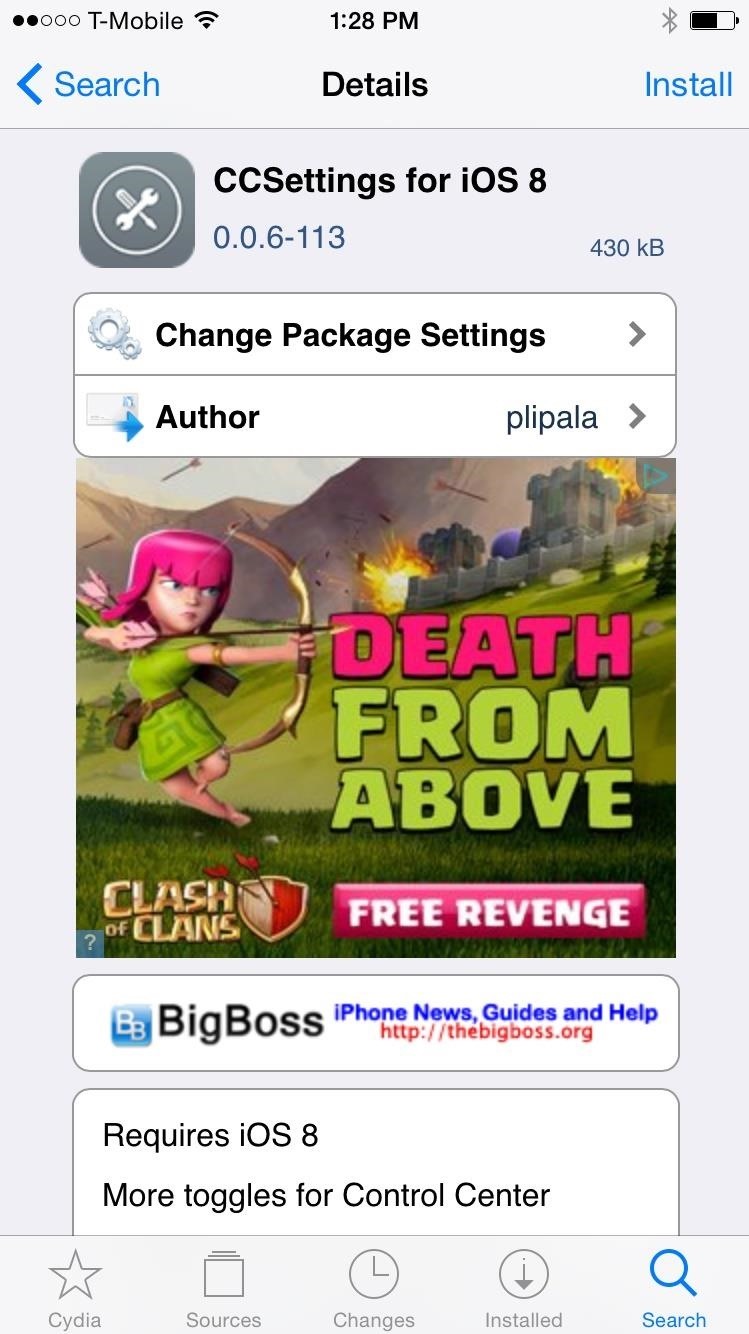
Step 2: Install CCSettings for iOS 8From Cydia, simply search for CCSettings, then tap the "Install" option on the top right, followed by "Confirm." After installation, hit "Restart Springboard" and wait for your device to boot back up.

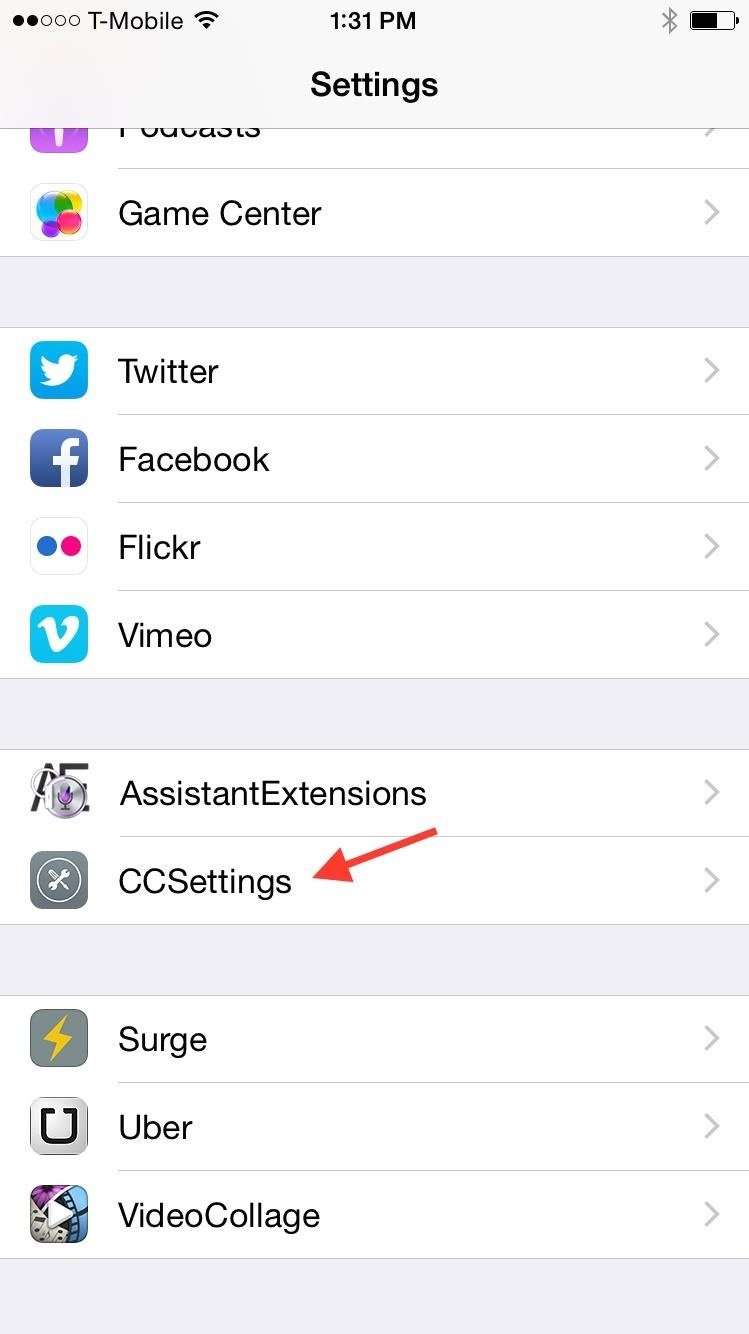
Step 3: Add More Toggles to the Control CenterNow head to Settings -> CCSettings to begin editing your Control Center. A few of the settings that appear include:Toggles per line: chose how many toggles you want per line (4, 5 or 6) Dismiss control center: hide the Control Center automatically when you select a toggle Kill music: stops music when you tap the kill background toggle White list: choose which apps you don't want closed when tapping the kill background toggle The bottom half is where you can rearrange all the newly available and standard options. New toggles include Home, Lock, Kill Background, Respring, Screen Shot, Clear Badge, and Reboot, among others.

Step 4: Use Your New TogglesWhen you bring up your Control Center, you should see your new toggles in place. Depending on how many toggles you have per line, you can view the next line of toggles by swiping to either side. Are there any other Cydia apps or tweaks for iOS 8 that have caught your attention? Let us know in the comments below, and make sure to follow us on Facebook and Twitter more cool jailbreak hacks for iPad, iPhone, and iPod touch.


Have you ever looked at your iPhone dock and wished you could place an extra, essential, or highly utilized app on there? Currently, with the basic settings you can only place four, but there's always that one that you wish could add to the mix. Head into the Cydia app, select the Search tab, look
How to Mod Your Old iPod 30-Pin Dock into a Bluetooth Speaker


In the old version of the music app you could shuffle all songs when songs were selected: This feature seems to be absent in iOS 8.4 and the new music app: What are the options for shuffling
How to Shuffle Songs in the Music App on iPhone or iPad


name.tsk.xml - is the task file, which stores the task and actions. You can import this by selecting the task tab at the top and long clicking on it. You will only see files ending with .tsk.xml. Q: Tasker how to add exit task? A: Make sure you have the exit task ready. Go to the profile tab and long click on the entry task.
Totally new to Tasker: Help with how to create task for


Personalization Panel for Windows 10. The good news is that, you can get back the classic Personalization window back in Windows 10 by installing a free utility called Personalization Panel. Personalization Panel is a free software from our friends at WinAero to add the missing Personalization window to Windows 10's desktop context menu. The
The volume control icon has disappeared from the taskbar


Pandora is an Internet radio which saves your browsing behavior and uses it to create a personalized list of music for you. It also allows you to create stations so that it will be easier to browse your favorite music according to genre or artist.
How Do You Create A Station On Pandora? - YouTube


Method 2: How to View iPhone Messages on PC/Mac from iTunes Backup. If have made an iTunes backup for your iPhone text messages and want to view them on computer, then the following are the detailed steps on how you can view iPhone messages on computer from iTunes backup. Step 1. Choose the iTunes backup to view messages.
How to send iMessages on IPhone or iPad | iMore


How To: Disable the 'Good Morning' Message on Your iPhone's Lock Screen How To: Remove Widgets from Your iPhone's Lock Screen How To: Get the Most Out of iOS 11's New Lock Screen-Style Notification Center How To: Access Your Screen Time Usage Stats Faster in iOS 12 for iPhone
iOS Basics: How to Add Widgets to Your iPhone's Lock Screen


Having these alerts installed on your Samsung Galaxy is for your own safety, but for those that want to know how to turn off severe weather alert sounds, we'll explain below. All Samsung Galaxy devices have emergency or severe weather alerts and notifications just like other smartphones.
Samsung Galaxy S7: How to Add a Weather Widget to - YouTube


If you have a free Flickr account that has more than 1,000 photos or videos, you'll no longer be able to upload any new content unless you upgrade to its paid plan. And if you're holding any
How to Use Flickr's 1TB of Free Space to Store More Than Pictures


Thermocouple attachment to an in-line package (SOIC) for reflow. This feature is not available right now. Please try again later.
How to Begin circuit bending « Other Devices :: WonderHowTo


Your Android phone has a built-in speed dial function that's under the radar, but if you're willing to give up space on a home screen, you can set up a snazzy one-click speed dial page in just a
How to Set Speed Dial on Android: 10 Steps (with Pictures)


For the most part, Finder has had the same basic functionality through the various releases of OS X. But Apple's lack of interest in adding new bells and whistles to the backbone of their operating system simply means that 3rd-party developers get to shine, and Tran Ky Nam is one such developer.
Helt Trick Out Finder på din Mac med XtraFinder | Ios Og

News: iOS 12 Beta 5 for iPhones Released to Apple Developers

News: iOS 12 Beta 5 for iPhones Released to Apple Developers

Apple released the fifth developer beta for iOS 12 on Monday, July 30, only 13 days after the release of dev beta 4 and 12 days after public beta 3. Until this release, Apple kept a consistent two-week schedule for developer beta updates, so we were a little surprised to see this one drop one day early.The new iOS 12 developer beta 5 appears to mostly include bug fixes and security patches, including for an issue where you couldn't wake your iPhone if put to sleep while the brightness was fully dimmed as well as an issue where cellular data stats would continuously refresh. There is also a new haptic feedback for attempting to launch the app switcher when no apps are in the background.Update: iOS 12 Developer Beta 6 Released for iPhone Software Testers If you want to update your iPhone to iOS 12 dev beta 5, you need to be a registered developer with a valid configuration profile. If you have iOS 12's new "Automatic Updates" enabled, you can let the software update overnight. To download the new beta right now, however, open the Settings app, tap "General," then "Software Update." Select "Download and Install," then follow the on-screen prompts to download and install iOS 12 dev beta 5.Don't Miss: All the Apps That Are Buggy or Broken on iOS 12 Beta for iPhone While this beta release is only available to developers, public testers received the update the next day. Public beta 4 is exactly the same as this developer beta 5.One of the biggest changes to come with dev beta 4 and public beta 3 was a patch for the popular game Fortnite. Fans of the game that installed iOS 12 from the beginning were quickly displeased to find that the software would cause the game to crash frequently, making Fornite near-impossible to play on the beta, but that's no longer an issue.
Resolved IssuesHere are some of the issues affecting previous beta versions that iOS 12 dev beta 5 fixes:App Store:An error message might appear while attempting to install an app. (41858048) — Workaround: Try installing the app again. CoreML:Models with flexible input sizes may unexpectedly reject an input using the default size displayed in Xcode's type field. (40632323) — Workaround: Supply a non-default size input on first prediction call. Phone and FaceTime:The cellular signal status bar indicator on iPhone X might be inaccurate while on the Lock Screen or the Home Screen. (41909622) The Cellular Data section in Settings > Cellular might refresh continuously. (41587310) Screen Time:Usage data and settings might not sync between devices. (41259736) — Workaround: Restart the affected devices. Siri:Siri Shortcuts might not work while using CarPlay. (39882673, 41652481) Siri Shortcuts might not be restored from iCloud backup. (40899084) SiriKit queries might be delayed or result in an error message. (41759318) — Workaround: Restart the affected device. Wallet:Wallet might unexpectedly quit on launch. (41603255) — Workaround: Use the application switcher to quit Wallet then try launching it again.
Known IssuesNew issues that appear in dev beta 5 are bolded below:Bluetooth:After restarting your device, paired Bluetooth accessories might not function correctly or might be displayed using the device's address rather than its name. (42397527) — Workaround: In Bluetooth settings, select Forget This Device and pair the accessory to your device again. CoreGraphics:Various CoreGraphics calls have been hardened against continuing with invalid parameters. In iOS 12 beta, these calls may now return NULL or return early. (38344690) HomeKit:Inviting iOS 11 users who have multiple email addresses associated with their Apple ID to a home might not succeed. (41033550) — Workaround: Send the invitation to a different email address or phone number associated with the Apple ID of the iOS 11 user. Localization:Certain languages may exhibit clipped or misaligned layout. (40420329) Certain languages may display unlocalized text. (40420422) MediaPlayer Framework:When a queueTransaction is performed on applicationQueuePlayer to modify the position of a song, the queue returns unchanged. (39401344) Phone and FaceTime:Group FaceTime calls cannot be initiated between iOS 12 beta 3 and the first iOS 12 beta release. (39873802) — Workaround: Users should update to iOS 12 beta 3. iPod touch (6th generation), iPhone 5s, iPhone 6, iPhone 6 Plus, iPad mini 2, iPad mini 3, and iPad Air support only audio (no video) during Group FaceTime calls in iOS 12 beta. In iOS 12 beta, Camera Effects in Messages is available only on iPhone SE and iPhone 6s or later and is unavailable on iPad. Camera Effects in FaceTime is available only on iPhone 7 or later and is unavailable on iPad. Wi-Fi calls might end unexpectedly when transitioning from Wi-Fi to cellular while on the T-Mobile network. (39251828) Screen Time:"Picked Up Phone" statistics might be inflated due to data syncing from other devices signed into the same iCloud account. (39917173) Siri:Using Apple Pay Cash to send or request money might produce an error. (41015948) — Workaround: Include a dollar amount in the Siri request, for example: "Send 10 dollars to Johnny Appleseed with Apple Pay". While using CarPlay, Siri is unable to open an app by name. Additionally, Shortcuts which involve opening an app won't function. (41099393) Some Shortcuts requests might not succeed and display "Shortcuts will continue with your request". If your app sends a ContinueInApp response code, Siri doesn't launch the app. (41507171) While multiple ride-sharing apps are installed, Siri might open the app instead of providing an ETA or location when asked. (42324032) — Workaround: Ask Siri for the ETA or location again. Users might not see custom UI when using Siri Suggestions Shortcuts with built-in intents. (42406900) — Workaround: Add the shortcut to Siri in Settings > Siri & Search. Then use Siri to run the shortcut and verify the custom UI within Siri While using CarPlay, Shortcuts which require confirmation might not work. (42444240) Siri Shortcuts might not work if a device is locked. (41307405) InSwift, the shortcut property of INVoiceShortcut must be accessed as _shortcut. (40418400) Siri Suggestions for Shortcuts are enabled on iPhone 6s or later, iPad Pro, iPad (5th generation or later), iPad Air 2, and iPad mini 4. (40669231) UIKit:You might encounter issues with systemLayoutSizeFitting(_:) when using a UICollectionViewCell subclass that requires updateConstraints(). (42138227) — Workaround: Don't call the cell's setNeedsUpdateConstraints() method unless you need to support live constraint changes. If you need to support live constraint changes, call updateConstraintsIfNeeded() before calling systemLayoutSizeFitting(_:). Xcode:When using Messages in the iOS Simulator, a message might not be delivered from User A to User B. (40916530) — Workaround: Send a message from User B to User A.Don't Miss: Fortnite Finally Fixed on the iOS 12 Beta for iPhonesFollow Gadget Hacks on Facebook, Twitter, YouTube, and Flipboard Follow WonderHowTo on Facebook, Twitter, Pinterest, and Flipboard
Cover image and screenshots by Jake Peterson/Gadget Hacks


HOW to forward calls to another number ,**62* || Secret code all mobile phones in U

But as it turns out, there's a fairly hidden menu on Samsung's flagships that'll give you a tailor-made audio experience and help you get the most out of your S8-AKG pairing. A feature called Adapt Sound is buried pretty deep in Settings, but it's definitley worth digging into. It basically runs a hearing test to provide a personalized sound
The Galaxy S9's 'Adapt Sound' Feature Makes Your AKG Earbuds


How To: Make a remote control work with just one battery How To: Program a Comcast remote How To: Disassemble your iPhone 4 and remove the internal components How To: Make an IR detection device and measure temperature w/ quenched phosphors
How to Convert temperature measured in Celsius to Fahrenheit


Whether you know or not, the Safari browser on your iPhone comes with the pop-up blocker feature that prevents any websites to show you pop-ups. The feature comes enabled by default so that you don't see any of those annoying pop-ups as soon as you start using Safari on your iPhone.
How to Block Pop-Ups in the Safari iPhone 5 App - Solve Your Tech


Jun 06, 2018 · It certainly offers a better user experience — the Lens app scans in real time as opposed to the static Lens in Google Photos, which unintuitively requires that you launch the Photos app, find a
How to Use Google Lens' New Features - lifehacker.com


Okay, okay, so maybe the ab selfie isn't exactly a thing. But since people love to take photos of their abs and post them on Instagram, this term should totally exist. You should honestly never post a photo of your abs on your feed. Sure, you might have the most beautiful abs ever and people might love seeing them.
Instagram 101: How to Add More Than 30 Hashtags to Your Posts


Is there any way to change the phone's language on a per-application basis? This would presumably require root access, which I have available. Basically, I'm looking for a root app which will chance the Unix locale for selected apps, or something like that. I want to make Google Now work without changing every other application to English
App Locale | Xposed Module Repository


How To: Download Any Video On Google Chrome! What's up, in this video I am going to be showing you how to download any video on Google Chrome using an extension. This extension doesn't work for
Download Video on Chrome with These 5 Free Online Video


How To: Enable the Hidden Debug Options for Select Google Apps on Your Nexus 5 News: Christmas Is Coming Early! Android 7.1 Beta Is Hitting Nexus Devices This Month How To: Disable Double-Tap to Wake While Making Calls on Your Nexus 6 How To: Hide Your Nexus 7's Soft Keys to Maximize Usable Screen Space
How to Enable Developer Options on Your Nexus « Nexus 7


The Ultimate Facebook Prank : How To "Kill" Your Friends on Facebook by Faking Their Deaths It only takes a minute for something well intentioned to turn into something sinister. Facebook created 'memorial pages' as way for friends and family to share their thoughts and feelings for those that are no longer with us.
How to Fake your death online « Practical Jokes & Pranks


Not every useful app can be found on Google's Play Store. In fact, there's a plethora of APKs that Google doesn't offer. In this list, we have prepared a list of the best Android apps you can
16 Best Android Apps Not on Google Play Store of 2019


How To: Get CyanogenMod's cLock Home & Lock Screen Widget on a Non-Rooted Samsung Galaxy S4 How To: Add Custom Lock Screen Widgets to Your Nexus 7, Samsung Galaxy S3, & Other Android 4.2 Devices How To: Bring iOS 7-Style Notifications to Your Samsung Galaxy S3 or Other Android Device
Customize Your Android Lock Screen with New Unlock Effects

Sports News, Scores, Schedules, Stats, Photos and Videos


To turn the screen back on, just do what you normally would—hit the power or home button. Overall, this module is a great way to sleep the device faster, or to alleviate some stress on your power button, if you're worried about it crapping out on you in the near future.
How to turn on your Samsung Galaxy phones without the power


The problem is, how can the webmaster check out how his/her site look like on a mobile device, if he/she does not own a smartphone? Fret not, with a little trickery, you can easily use your desktop browser to access your site and make it think that you are using a mobile browser. Every browser comes with its own user-agent.
Firefox browser blocks sites and advertisers from tracking

How To: Record Phone Calls on Any Android Device

How To: Record Phone Calls on Any Android Device
There are plenty of legitimate reasons that you might want to record a phone conversation. Let's say you operate a business and take orders over the phone, and you don't want to miss an item. Or perhaps you need to jot down some notes from a recent conference call, and things were just happening too quickly in real time.But whatever your reason, recording phone calls on an Android device can be a tricky subject due to the sheer variety of Android devices available. This makes it pretty hard to pin down one particular solution that will work for every phone. That said, we've found some methods that you can try right now on your Android device, regardless of its make and model.Don't Miss: Always-Updated List of Phones That Will Get Android Pie
DisclaimerBefore you start recording calls, you should first check if its legal in your state. While federal law permits recording telephone calls and in-person conversations with the consent of at least one of the parties (e.g., you), these laws can vary from state to state. California, for instance, has a two-party consent law, which means you have to get permission from the other person(s) before you can start recording.
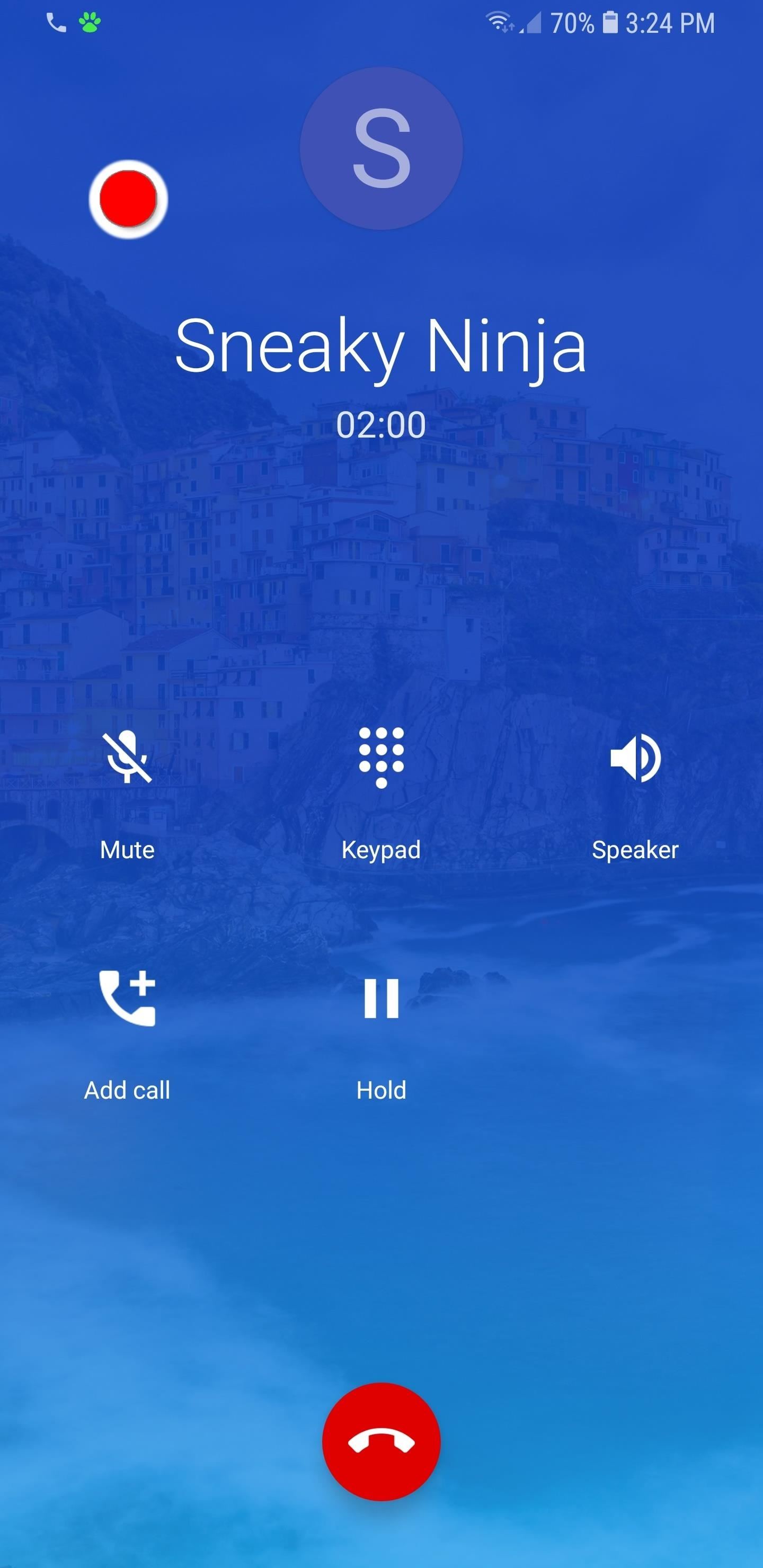
Method 1: Use a Call Recorder AppThe easiest method is to try a simple call recorder app. One downside to consider here is that the recording quality might not be perfect, but it should still be loud and clear. There are many different call recorder apps on the Google Play Store, but that means picking the right one can be a little problematic.Enter Boldbeast Recorder — it's free to use, will work on a ton of Android devices off the bat, and is continually updated to ensure it always stays well ahead of the competition. While the app gives you the option to buy its full version for $9.99, the free version functions exceptionally well even without premium features alike advanced search and automatic call recording.Once installed and enabled, Boldbeast Recorder overlays a circular record button onto the phone app for intuitive recording. On the whole, the recordings are crystal-clear and very easy to listen to. The app also shines in terms of overall accessibility, giving you the ability to instantly play recordings on the fly. If those weren't enough, you can even add notes or share the sound file with ease. In all, you can't go wrong in choosing Boldbeast as your go-to app for recording phone calls. Besides its ease of use, it's one of the few call recording apps out there that supports almost all Android devices. And because it's continually being updated, there's little doubt that the app will be able to work for even more phones — even devices that haven't been released — as it continues to evolve.More Info: How to Record Phone Calls on Your Android Using Boldbeast

Method 2: Use Google VoiceGoogle Voice is great alternative to dedicated call recording apps to record conversations, and has the added bonus of being completely free to use. It does have some downsides, however, such as the ability to only record incoming phone calls, not outgoing. In addition, the app will verbally notify the caller when call recording has been started and stopped, even if you've muted the call.Despite its shortcomings, however, Google Voice does have its strengths. For one, recording an incoming call very easy to accomplish on the app, and only requires you to tap on "4" in your Phone app's keypad to start or stop recording. These recordings should be in higher quality than most call recorder apps as well. Accessing your recordings is just as intuitive, and can be done by going into Google Voice's "Voicemail" page. When all is said and done, Google Voice is ideally suited for recording school, business, or work-related phone conversations like interviews, important meetings, and verbal contracts. Best of all, the service is free to use, so we highly recommend giving this app a try if you need a recording app without all the bells and whistles.More Info: How to Calls Using Google Voice on Your iPhone or Android

Method 3: Use SkypeRecording conversations isn't just limited to audio calls, as you now have the ability to record video calls for later viewing, thanks to Skype. Of course, you can only record calls done within Skype, and just like Google Voice, it notifies the person on the other end of the call when you've started or stopped recording. A copy of the recording also goes to both you and the other caller for full transparency.The benefits far outweigh its limitations, however, and Skype lets you record both video and audio calls thanks to a recording function that's easy to access and use. In addition, viewing or listening to your recordings is just as intuitive, and the app gives you multiple options to save or share your video and audio files in a pinch. If you're concerned about your privacy, Skype has you covered, as it only keeps any recordings for a maximum of 30 days. This gives you ample time to save or share your recordings for safekeeping while ensuring privacy and security. As such, recording a call on Skype — be it video or audio — is perfect for memorable occasions like viewing your newborn for the first time, and so on.More Info: How to Record Video & Audio Calls with Skype
Method 4: Use a RecorderOf course, you can forego using an app or service altogether and simply record phone conversations the old-fashioned way using a voice recorder. Granted, this isn't the most high-tech method on the list, but it's still among the most effective means to record a phone conversation. In fact, it can even record audio regardless what app you're using, be it Slack, WhatsApp, Skype, or your Phone app.Obviously, you'll need to set your conversations to speaker mode to get the best results, so if you go this route, be sure to go somewhere quiet before you initiate recording in order to get the highest quality audio possible. That said, there's plenty of great digital voice recorders out there, but if you want to check some out right now, here's a list of some of the top-rated digital audio/voice recorders online:EVIDA 8 GB Recorder (~$20): Amazon Olympus 4 GB WS-852 Recorder (~$60): Amazon | Best Buy | Walmart Olympus 8 GB WS-853 Recorder (~$70): Amazon | Best Buy | Walmart Tokego 8 GB Recorder (~$28): Amazon Yemenren 8 GB Recorder (~$32): Amazon Sony 4 GB ICDPX370 Recorder (~$48): Amazon | Best Buy | Walmart Sony 4 GB ICDUX560BLK Recorder (~$95): Amazon | Best Buy | Walmart Which call recording solution worked best for your particular Android phone? Do you have a preferred method you didn't see in this list that you'd recommend? Let us know in the comment section below.Don't Miss: 6 Types of Bad Apps You Should Never DownloadFollow Gadget Hacks on Pinterest, Twitter, YouTube, and Flipboard Sign up for Gadget Hacks' daily newsletter or weekly Android and iOS updates Follow WonderHowTo on Facebook, Twitter, Pinterest, and Flipboard
Cover image by Dallas Thomas/Gadget Hacks, screenshots by Amboy Manalo/Gadget Hacks


Well, we bring you 8 Windows 10 tricks, secret features and hidden features not many know about. These Windows 10 Hidden features might be limited to the Anniversary Update or Creators Update.
16 Hidden Apple TV Features You Should Know | PCMag.com


One of the most exciting additions to iOS 12 for iPhones is called Shortcuts, a tool integrated with Siri to help you get things done faster. While there are a few recommended shortcuts available to you in Siri's settings in iOS 12, the Shortcuts app brings the functionality of Workflow to Siri so you can build your own custom actions or select from the gallery of available shortcuts.


How to install Facebook lite on iPhone 2018 | iRakTech Messenger lite . In this video I'm showing u how to create an Apple ID account in turkey. Iink create Apple ID

The world's first cloud-oriented smartphone, Nextbit Robin, is now available to the masses via Amazon with free one-day shipping for Prime members. Robin is designed to streamline all the times you've tried to download an app or take a photo only to be hit by the "not enough space" notification.
Nextbit's Robin is an Android phone that never runs out of


(Repetitive text removed to save space, all key codes are public static final int.) /** Unknown key code. */ KEYCODE_UNKNOWN = 0; /** Soft Left key. * Usually situated below the display on phones and used as a multi-function * feature key for selecting a software defined function shown on the bottom left * of the display.
Galaxy Nexus First Impressions - Q&A : Android


Read on to find out all you need to know about Microsoft's new edge browser. Microsoft Edge: Release Date. While a beta versions of Spartan/Microsoft Edge has been available to developers for months, us regular consumers will need to wait until July 29th to grab Microsoft Edge. That's the date Windows 10 launches on both desktop and mobile.
Here's what you need to know about Microsoft's Chromium based


To place your iPhone (any model) in the new iOS 8 grayscale mode, just go to Settings-> General-> Accessibility and toggle on Grayscale. Now, your entire display will be grayed out. I think it looks kinda of cool, and way better than the invert colors option , so give it a try.
How to Enable the Hidden Grayscale Mode on Your Pixel or


NAVIER HUD - New navigation concept Navier HUD is an application available on Android phones. Navier HUD uses the HUD (Head-up display) concept to help drivers without having to take their eyes off the road. The driving information are projected on to the windshield when using Navier HUD while the phone lie down in front of the windshield.
How to Enable Developer Options on Your Nexus « Nexus 7


News: Cord-Cutting Just Got Cheaper — AT&T's $15/Month WatchTV Service Is Coming Next Week By Jon cord-cutting just got cheaper. For those looking for a
All the news cord cutters need about cord cutting! Covering


The same report shows that if you sideload apps, you're almost seven times more likely to be infected than if you stick to Google Play as your app source. All of the data provided in the report is quite interesting, but there's a clear pattern among malware-infected users.
Google's Security Report Shows A Clear Pattern Among Malware


How To: Turn Your iPad Mini's Box into a Free Stand and Charging Dock How To: Mod Your Old iPod 30-Pin Dock into a Bluetooth Speaker for Your iPhone 5 News: The Best Black Friday 2017 Deals on iPhone X Accessories How To: Turn Your Apple Watch Gold (Without Spending $10,000)
How to modify your Apple Watch box into an Edition-style
Google Assistant 101: How to Set Up Voice Command Shortcuts

Google Assistant 101: How to Set Up Voice Command Shortcuts
The Google Assistant is great about understanding what you actually mean, so you don't have to issue exact commands like you do with Amazon Alexa, for instance. But even though it's a master of colloquial speech, it could still be better, and that's where shortcuts come into play.With shortcuts, you can say literally anything to your Google Assistant, whether it's on Android, iOS, or Google Home, and the AI will understand what you mean. The way it works is simple: Just set up a custom trigger phrase, then translate that into a command the Assistant will understand. From then on, when you say this custom phrase, Google Assistant will "hear" the more standard command instead.This is a great way to get around clunky commands like "Play my 80s playlist on the living room Chromecast," because you can streamline the whole thing into just "Play my 80s playlist" if you want. Or, if you're tired of interacting with third-party Assistant Apps, you could turn something like "Ask Harmony to turn off my TV" into just "Turn off the TV."It's definitely one of Google Assistant's best features, so if you'd like to make voice commands even more natural, I'll show you how it all works below.Don't Miss: Google Assistant 101: How to Add Your Smart Home Devices to Control Them by Voice

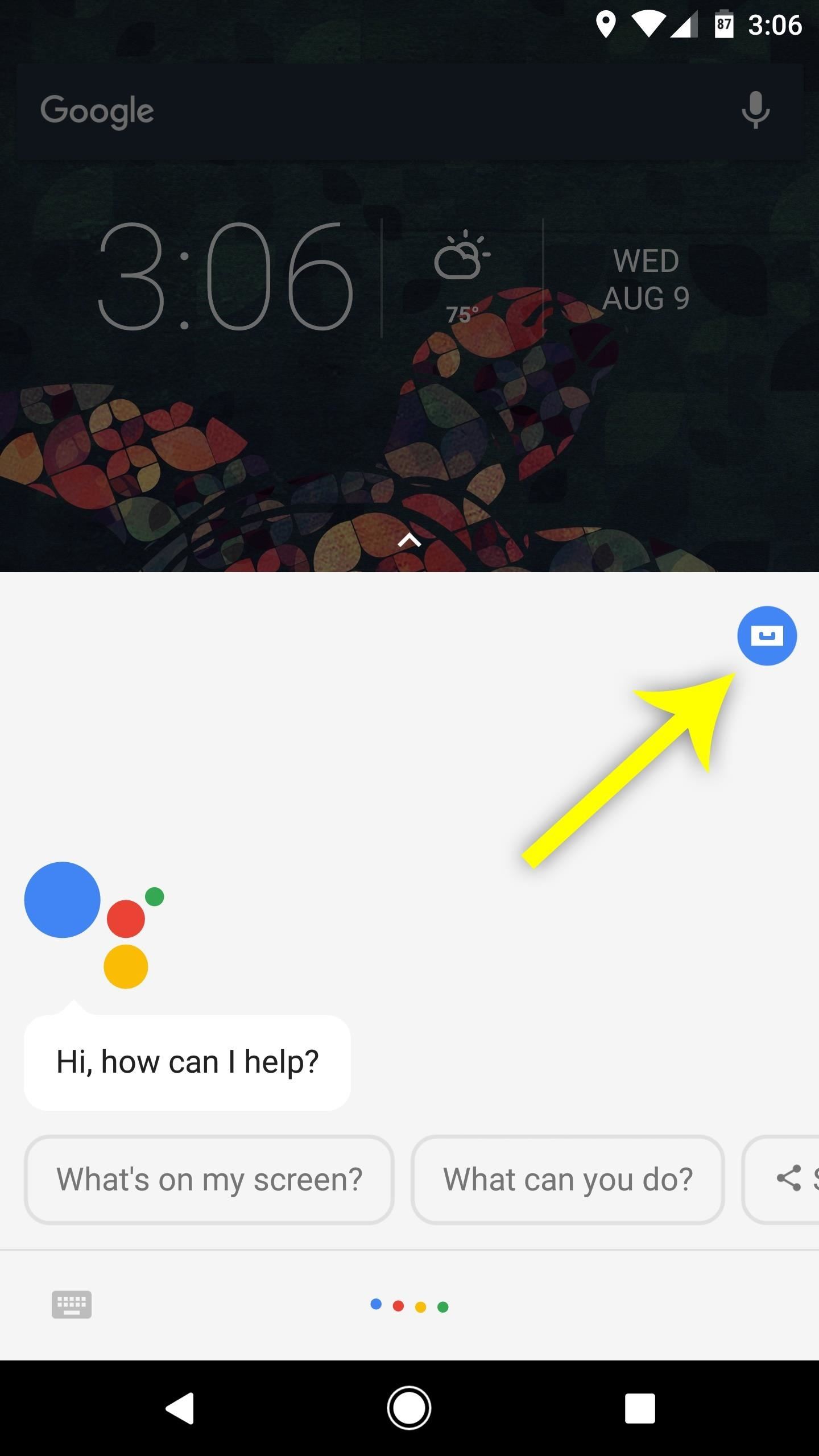
Step 1: Access the Shortcuts MenuTo start, trigger your Assistant by long-pressing your home button on Android or by opening the Google Assistant app on iOS. From there, tap the blue circular menu button near the top-left corner of the interface. After that, tap the three-dot menu button at the top of the screen, then choose "Shortcuts" on the next menu.Note: If you're a Google Home user, open the Google Home app for Android or iOS, then tap the hamburger icon and choose "More Settings" to find the Shortcuts menu.

Step 2: Add Custom PhrasesNext, you'll be presented with a list of example shortcuts. If any of these piques your interest, you can tap it, then press "Save" to add it to your list of active shortcuts.However, if you'd like to create your own custom shortcut, start by tapping the blue + button in the bottom-right corner. From there, enter the command you want to say into the first field, then another field will appear. If you'd like, you can enter another custom phrase that will trigger the same action. All told, you can have up to five different custom phrases, and there are no rules, so be as creative as you want!

Step 3: Enter an Action That Google Assistant Should PerformAfter you've filled out the When I say OK Google field(s), select the input field beneath Google Assistant should do. This is where you can type in the phrase or command that Google Assistant will "hear" when you say one of the custom commands.As with all Google Assistant commands, these don't have to be exact. However, you should experiment a little to make sure the phrase you're entering consistently triggers the intended action. For example, if Google Assistant struggles with "Turn the lights up to full brightness" occasionally, you should enter something like "Set the lights to 100% brightness" instead.

Step 4: Use Your New ShortcutsAt this point, you're all set to try out your new shortcut. Just trigger the Assistant by saying "OK Google" or by pressing the microphone button, then say the phrase you entered in Step 2. Even if this was a phrase that Google Assistant couldn't handle before, it will now execute the command you entered in Step 3 instead. Overall, it's a great way to streamline clunky commands and make the Google Assistant even more colloquial. You can even have a little fun with it using a shortcut like "Knock knock" and an action like "Repeat after me: Who's there?" What are some of the shortcuts you've made? Let us know in the comment section below.Don't Miss: Google Assistant 101: How to Manage Account PermissionsFollow Gadget Hacks on Facebook, Twitter, Google+, YouTube, and Instagram Follow WonderHowTo on Facebook, Twitter, Pinterest, and Google+
Cover image and screenshots by Dallas Thomas/Gadget Hacks


#How to make #Pistol #Pen #Powerful #Simple #Toy Gun @ About GearMan Channel : This channel is all about DIY, How To, Home Made, Great Ideas, simple, funny and entertainment. @ WARNING : My videos are provided only for entertainment and watching purposes only. Please don't try to do what I did in my videos.
How To Make a simple & powerful Pen Gun - Pinterest


Sent an email by mistake? Find out How To Recall an Email in Gmail. Unsend the message you sent by mistake in a few easy steps.
How To "Unsend" An Email in Gmail - YouTube


In this project, you'll learn how to re-purpose low-cost sprinkler parts into a high-powered CANDY CANNON. Be the coolest person on the block by building a pneumatic device that will launch candy 100 feet in the air—you can make it rain down all kinds of sugary treats!!!
Make It Rain Down Chocolate! for Real! Here's How to Make


Here's How to Open Links Directly in Chrome's Incognito and Firefox Private Mode on Android. Skip to Navigation Skip to the Content of this Page Back to the Accessibility Menu Guiding Tech
How To: Enhance Chrome's Incognito Mode with Search - Android


If you have a USB cable that fits your phone, attach that, and your phone will detect any images and download them, via the media section on your old phone, onto your laptop. Then it should store them on a file, which you can transfer over to your pictures folder.


The boot animation is the first thing that you see when powering on your Android phone or tablet, after the operator or manufacturer logo. Although it does not serve a purpose functionally, an eye-catching boot animation can certainly make your device stand out while booting.
How To Download and Install Android 8.0 Oreo on Any Android Phone


On your iPhone, go to the Settings app. Tap your name at the top of the screen (in iOS 9 and earlier, skip this step). Tap iCloud. Move the Notes slider to on/green. Repeat this process on every device you want to sync notes via iCloud.
Apple's iPhone 5 User Guide Tells You Everything You Need To


As of June 2017, Twitter now sends a digest email referencing all your unread notifications about activity related to your account, instead of separate emails for each type and instance. This is to reduce the noise of Twitter email in your inbox. Managing your subscription to the digest:
How to Respond to another person's Tweet on Twitter

Sony Unveils the Xperia XZ Premium with 4K HDR Display, 19 MP


How To: Transform a camera into a taser News: Taser dear friends with hacked camera Contest: My Disposable Camera Taser Friday Fresh: Make Your Own Police Taser & More News: Easy! Cell Phone Camera Macro Mod (5X Zoom)
Taser Camera Hack « Wonder How To


This means that the majority of custom boot animations don't work for the GS5. But, after flashing a single ZIP, you can use the more common "bootanimation.zip" files on your GS5.
How To Remove Carrier Boot Animation On Galaxy S4 - Dory Labs


Because Instagram posts appear chronologically in the hashtag search galleries based on the chronological time at which the post was shared (not when the hashtag was added). So, if you're using those super popular hashtags, every single second matters to your engagement. If you're wasting 30 seconds even to add a comment after posting, add
15 Things You Should NEVER Post On Instagram | TheTalko

How to Easily Create Your Own Custom Font from Scratch


This means, we're simplifying the app in many place and it also means more of a focus on things like pricing quality/coverage. This is just the first release of many over the coming months. Expect to *gradually* have an *entirely* refreshed app by Christmas.
How to Use the Shop Savvy app on your Android cell phone


Autoplay When autoplay is enabled, a suggested video will automatically play next. Up next How to Put a YouTube video into a PowerPoint - Duration: 9:37.

News: The Best Accessories to Buy for Your Headphones Jack-Less iPhone 7

News: The Best Accessories to Buy for Your Headphones Jack-Less iPhone 7
Apple caught a lot of flak for removing the headphone jack in their iPhone 7 models, but they definitely got the last laugh when preorders with a delivery date of September 16 sold out within minutes. Headphone jack or not, the iPhone 7 and 7 Plus are still highly desirable products, and consumers have confirmed this by voting with their wallets.If you decided to take the risk and get an iPhone 7 knowing you'd miss the headphones jack, well, you'll just have to embrace Apple's new wireless world. Luckily, there are Bluetooth devices and adapters to fill your every need—car audio, home stereo, headphones, and more—so you won't even miss that 3.5 mm jack at all.Don't Miss: The iPhone 7's Lack of a Headphone Jack Creates a Big MacBook Problem

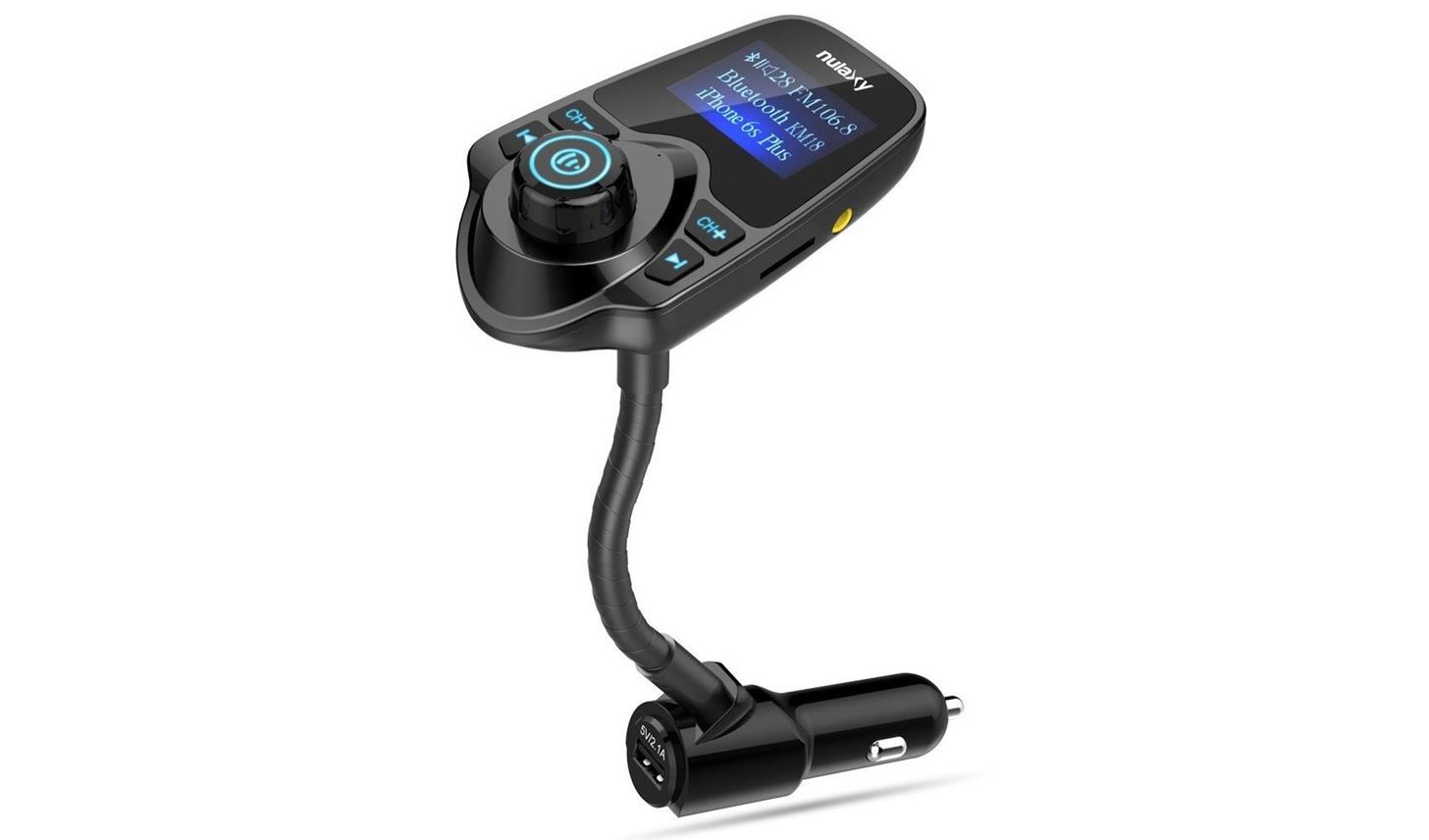
Car Audio AccessoriesFor this first section, we'll focus on getting your new iPhone 7 connected to your car wirelessly. If your car already has built-in Bluetooth, that would probably be your best bet—but for everyone else, these Bluetooth adapters have you covered in spades.Nulaxy Bluetooth FM TransmitterIf your car didn't come with an auxiliary headphone jack input, the best way to hook your iPhone 7 up to the stereo without using wires is to grab a Bluetooth receiver that broadcasts your tunes over FM radio. Out of these, our favorite is the Nulaxy Bluetooth FM Transmitter, which lets you control music playback, make and receive calls, and even select your broadcast frequency with its LCD display.Buy Nulaxy Bluetooth FM Transmitter from Amazon (currently $22.99) The Nulaxy Bluetooth FM Transmitter broadcasts directly to your radio. Image via Amazon SoundBot Auxiliary Car KitIf your car has an auxiliary 3.5 mm jack, the sound quality will be slightly better if you go with a Bluetooth adapter that plugs directly into your stereo. Out of these types of products, the most highly recommended option is the SoundBot Auxiliary Car Kit. This comes with a small disc that you mount anywhere in your car to serve as an in-call microphone and music playback controller. Attached to this is one wire that has two plugs on the end—one goes into your car's auxiliary input, and the other plugs into an included USB charger.Buy SoundBot Auxiliary Car Kit from Amazon (currently $19.99) SoundBot's Auxiliary Car Kit makes Bluetooth audio a breeze. Image via Amazon Bluetrip Auxiliary Car KitIf you'd like a more subtle solution, the Bluetrip Auxiliary Car Kit is functionally identical to SoundBot's kit, but it plugs directly into your cigarette lighter port with an ultra-low profile. From there, you just run a headphone cable over to your car's auxiliary input, then pair your iPhone to start playing some tunes.Buy Bluetrip Auxiliary Car Kit from Amazon (currently $30) The Bluetrip Auxiliary Car Kit is one of the most subtle solutions. Image via Amazon

Home Stereo AccessoriesNext up, we'll focus on getting your iPhone paired with your home theater system, stereo, or just a set of speakers. If you're all-in with Apple, you might have an AirPlay solution for this, but otherwise, these adapters will keep the tunes flowing throughout your house by simply adding Bluetooth functionality to your existing setup.Audioengine Premium ReceiverIf you want the absolute top of the line, your best option is the Audioengine Premium Receiver. This small box plugs into your home stereo system with either RCA outputs or a digital/optical audio jack (S/PDIF), and an included antenna extends the range of your iPhone's Bluetooth connection. A 24-bit digital-to-analog converter (DAC) ensures top-notch sound, and a milled aluminum enclosure makes the box itself a nice piece of hardware.Buy Audioengine Premium Receiver from Amazon (currently $189) The Audioengine Premium Receiver supports optical audio output and high-end sound. Image via Amazon HomeSpot Bluetooth AdapterFor a more cost-effective solution, the HomeSpot Bluetooth Adapter will pair your iPhone 7 with your home stereo at a cost of only $13. This small box supports mini-jack and RCA output, so it will work with almost any setup, and it even has a cool NFC function that will let your friends with Android devices pair with your stereo in one tap.Buy HomeSpot Bluetooth Adapter from Amazon (currently $19.57) The HomeSpot Bluetooth Adapter hooks your iPhone up to your stereo without breaking the bank. Image via Amazon Logitech Bluetooth AdapterIn the same vein as the HomeSpot box, the Logitech Bluetooth Adapter simply plugs into your stereo, then offers to pair itself with your iPhone for music playback. However, this option sports a more premium build quality, and offers direct RCA output, which should give a slight bump in audio quality over the HomeSpot's mini-jack adapter.Buy Logitech Bluetooth Adapter from Amazon (currently $23.98) The Logitech Bluetooth Adapter is a perfect midrange option for pairing your iPhone with a home stereo system. Image via Amazon

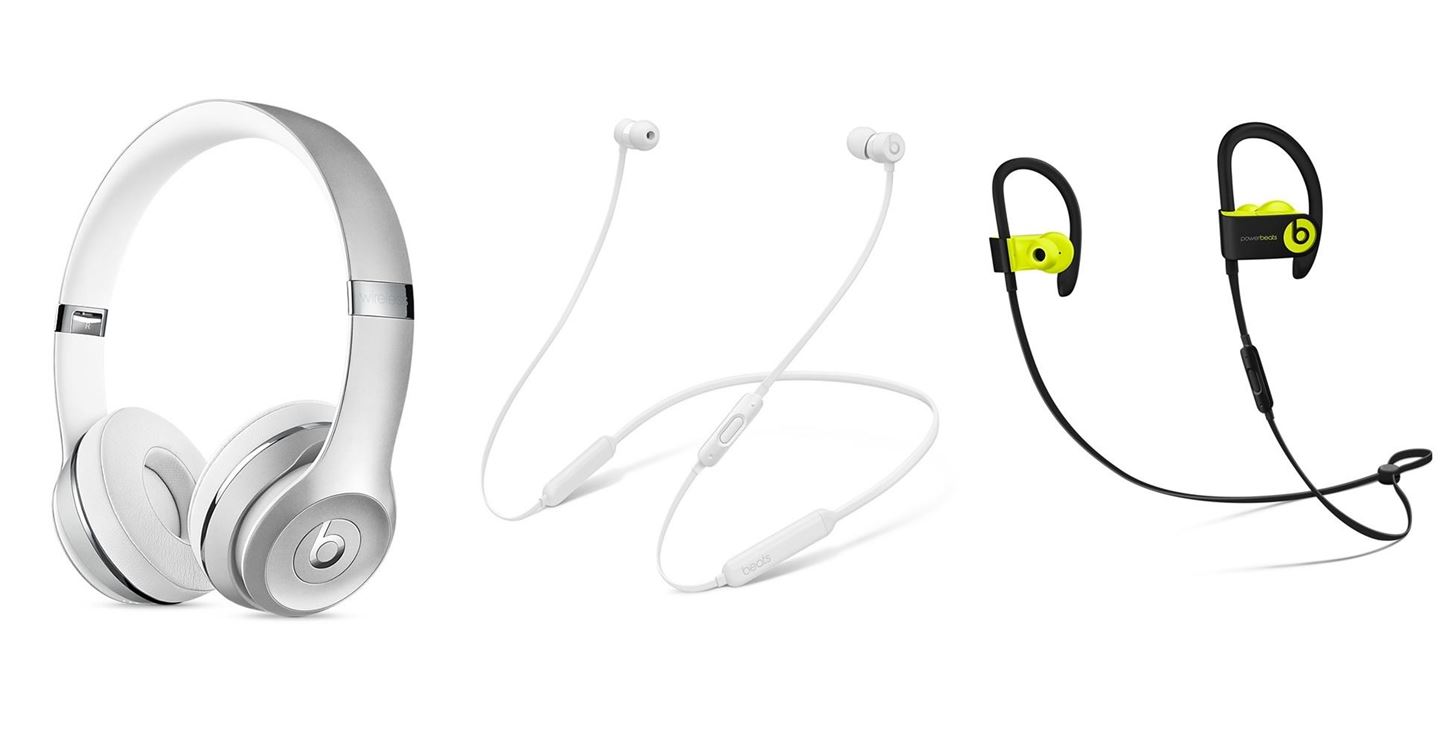
Bluetooth HeadphonesNext up, we'll look at some of the best options for wireless Bluetooth headphones. Apple's own AirPods will be a popular choice here, but they're not even out yet. Plus, if you'd rather have a bit more battery life or headphones that aren't so easily lost, the options we'll cover below would be a much better fit.Beats Headphones with Apple's W1 ChipNow that Apple owns Beats headphones, we're starting to see a renewed focus on high-quality wireless audio. In fact, Apple included their special W1 wireless processor in its latest Beats lineup, so audio performance and power efficiency should be similar to what you'd see with AirPods. But the best thing about this option is the variety—you've got three different models to choose from, so if AirPods are too tiny for your tastes, you'll find a perfect fit with Beats.Buy Beats Solo3 Headphones from Apple ($299.95) Buy BeatsX Earphones from Apple ($149.95) (coming soon) Buy PowerBeats3 Wireless Earphones from Apple ($199.95) From left to right: Beats Solo3, BeatsX, and PowerBeats3 headphones. Image via Apple LG Tone InfinimFor a non-Apple solution, LG Tone Infinim earbuds are hard to beat. The wireless headset features a lightweight flexible base that you wear around your neck, which houses an ample battery, call microphone, and buttons to control your music. The earbuds themselves are wired, but retract into the base for easy storage. Then, when you factor in top-notch sound, and battery life that's over three times greater than Apple's AirPods, LG Tone Infinim headphones are a steal at less than $100.Buy LG Tone Infinim from Amazon (currently $99.99) LG Tone Infinim earbuds have 16-hour battery life & top-notch sound. Image via Amazon Cowin E-7 Series HeadphonesIf you're a fan of traditional can-style headphones, the Cowin E-7 Series Headphones offer a great balance of performance and affordability. With active noise cancelling for crystal-clear audio, superb build quality, and ridiculous 30-hour battery life, you'll wonder why you ever used those basic EarPods to begin with.Buy Cowin E-7 Series Headphones from Amazon (currently $69.99) Cowin E-7 Series Headphones offer premium quality at a budget price. Image via Amazon

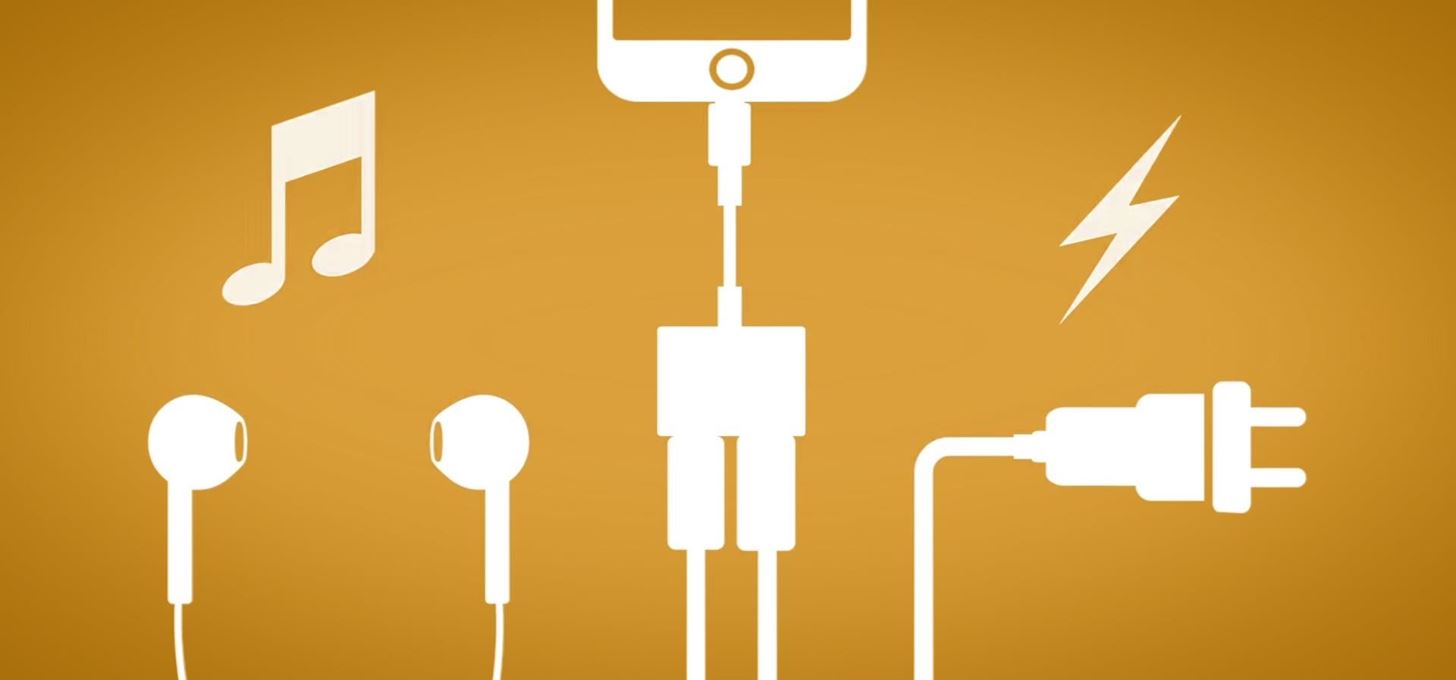
Charging While Listening to MusicIf you absolutely must use wired headphones with your iPhone 7, the included EarPods should do the trick, or you can use the mini-jack-to-Lightning adapter that came with your phone. But either way you go, you won't be able to charge your iPhone 7 while listening to music unless you buy some extra equipment. We've already covered all of the best ways to charge while jamming out, so make sure to check out the following guide for more info on this front.Don't Miss: How to Charge Your iPhone 7 While Listening to Music Image via Belkin Don't Miss: You'll Need New Accessories for the iPhone 7, Even Though It Looks the SameFollow Gadget Hacks on Facebook, Twitter, Google+, and YouTube Follow Apple Hacks on Facebook, Twitter, and Pinterest Follow WonderHowTo on Facebook, Twitter, Pinterest, and Google+
Cover photo by Sarote Impheng/123RF

Chrome 101: How to Block Popups & Intrusive Ads on Android


To opt out for five years: Call toll-free 1-888-5-OPT-OUT (1-888-567-8688) or visit

This course offers strategies for all creators interested in making educational videos on YouTube— whether you want to provide skill-building tips and help viewers advance their career, teach an online curriculum, make 'how-to' videos, or experiment with an entertaining learning series. Click into the lessons below to get started.
Change video privacy settings - Computer - YouTube Help


Sony Mobile has raised the bar for video quality on a mobile device after unveiling the Xperia XZ Premium - the world's first smartphone with 4K HDR display at Mobile World Congress in Barcelona. Also announced were the super mid-range Xperia XA1 and XA1 Ultra that build on the success of last
Sony Unveils the Xperia XZ2 Premium, Its First Smartphone


Not only do these free movie apps allow you to watch movies, but many also let you stream TV shows right from your phone or tablet. This is a great way to catch up on your favorite shows when you're on the go.
15 RV Apps You Just Have To Own - RVshare.com


Above, Android 4.1.2 with Sense 5.0 (left) and Android 4.3 (right). So, if you want the Quick Settings feature on your HTC One—or any Android device running Android 4.1 or lower—you'll have to use a third-party app like Power Toggles by Painless Death.
Control Spotify Music from an Easy-Access Notification Center


How to Uninstall Windows 10 Apps Using the Command Prompt. It goes without saying that once you remove an app, the only way to bring it back is to install the same package from scratch, so if
How To Reset And Reinstall The Camera App In Windows 10

How to use Google's Gboard keyboard on iOS on iPhone, iPad


How To Make GIF Images Into Live Wallpapers On Your Nexus 4 or Android Device September 27, 2013 By thegift73 4 Comments There are tons of great animated GIF images around the web these days, but being able to set them as a wallpaper on your Android device isn't something you can currently do using the stock Android OS, although this may
How to Create Your Own Wallpaper Android - YouTube


Unroot Samsung Galaxy Note5 and restore back to official stock firmware using Smart Switch (First Method) There are two effective method to unroot the Samsung Galaxy Note5. The first method is by using Samsung's owned app called "Smart Switch" that allows Galaxy Note 5 users to back up and transfer files but it also capable for restoring
Unroot and Restore Galaxy back to Stock using Samsung Odin


How to Turn Your NOOK Color Into an Android Tablet. By beaver84 Now I'm really enjoying the android and I'm looking forward to learning how to use it to its full
How to Stream Hulu on a Nook Color or other Android device

News: Gboard Makes Finding Emojis Even Easier on iPhone

News: Gboard Makes Finding Emojis Even Easier on iPhone

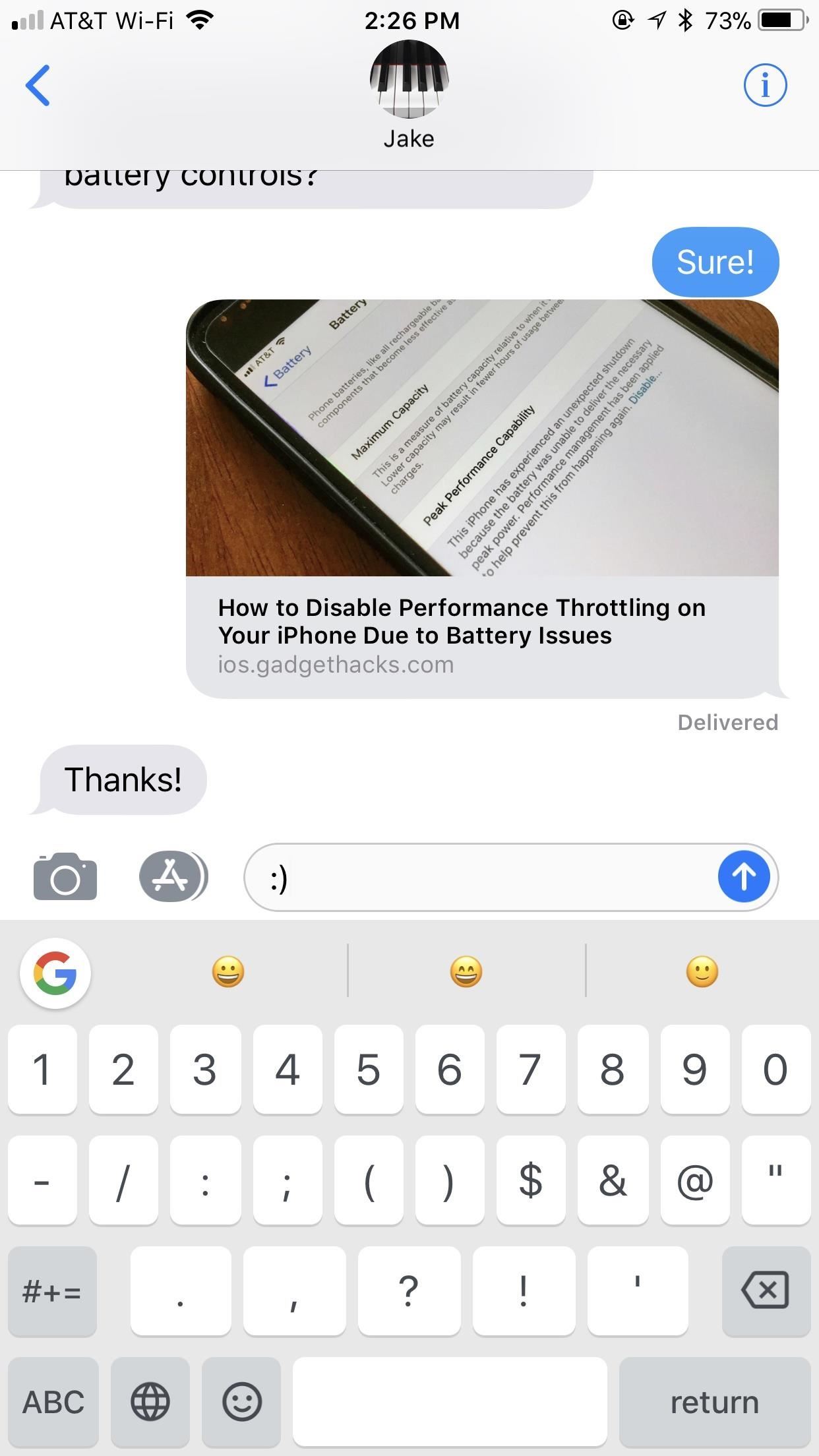
If you're looking for an alternative iOS keyboard for your iPhone, look no further than Gboard. The Google-made keyboard is bursting with features like web search, Google Maps, GIFs, and more. Now, Gboard is adding a new feature that'll make it easier to find the perfect emoji.In today's release update, Google is highlighting this new feature as a way for users who normally type out emoticons — like :) or :/ — to quickly access their emoji counterparts. Those who regularly use emojis, however, will also find the new feature useful, as you can skip the emoji keyboard altogether for a faster experience.Don't Miss: 17 Tips to Help You Master Gboard for iPhone If you want to try the feature out for yourself, you will need to update Gboard to the latest version. If you don't have Gboard, make to sure download it from the App Store here.After updating Gboard, the feature gets right to work. Simply type out the emoji using text, and Gboard will provide you with the corresponding emojis via the predictive text bar. As of now, it appears the feature only works with basic emoticons, so any emojis that would require more complicated text will not appear as a shortcut. Of course, for the trickier emojis, you can always use the emoji search tool in Gboard. Just tap the smiley face at the bottom of the keyboard, tap "Search emojis," then enter the name of the emoji you're looking for. Don't Miss: How to Reply to Texts With a Selfie GIF Using GboardFollow Gadget Hacks on Facebook, Twitter, YouTube, and Flipboard Follow WonderHowTo on Facebook, Twitter, Pinterest, and Flipboard
Cover image by Dallas Thomas/Gadget Hacks, screenshots by Jake Peterson/Gadget Hacks


Now that Dev-Team has released an updated RendSn0w 0.9 to jailbreak iPhone, iPod Touch OS 3.1.2, it's time to write a guide. In this tutorial you'll learn how to jailbreak iPhone 3.1.2, Jailbreak iPod Touch 3.1.2 and jailbreak & unlock iPhone 2G 3.1.2 using RedSnow 0.9.
How to jailbreak iOS 5.1.1 running on iPhone, iPad or iPod


Have you ever wondered how to set any song as an iPhone ringtone without iTunes just like many users? There is a way to get it done! You can use GarageBand to create a ringtone of your favorite song and then set it as text tone or ringtone on your iOS device.
How to Get Ringtones on iPhone with or without iTunes


Change password. Change your Google Account password. In order to change your password, you need to be signed in. Change your Google Account password.
How to Change Your Google Password - wikiHow


Over the last few years, the jailbreak community has released a number of jailbreak tools to jailbreak the iPhone, iPad and iPod touch for each iOS firmware file. This page has the most up-to-date information on the latest jailbreak tools that should be used to jailbreak your iPhone, iPad or iPod touch depending on the version of iOS running on it.
Jailbreak iOS 6.1.6 Using Redsn0w and P0sixspwn - iPhone Hacks


Siri makes it easy to call almost any contact on your iPhone with just a quick verbal command. I say almost because counterintuitive name pronunciations such as Caoimhe, which is actually pronounced "Keeva," will confuse the hell out of Siri. Luckily, there's a way to get Siri to understand
How To Make Siri Recognize Difficult To Pronounce Contact


Culture Leer en español Royal Caribbean's high-tech ship lets you be lazier than ever. Self-driving shuttles. Servers who'll find you anywhere to give you a drink.
Redditors who switched from Android phones to iPhone - what


When i watch my video from my computer, the quality is great. When I Upload the video to youtube, the quality is a lot worse. Please help, I will legit give someone $100 if they give me the solution to my problem.
Upload 3D videos - YouTube Help - Google Support


If you have an HTC Smartphone and you want to back up the device's contents, you need to install the phone's PC software to synchronize your device with your computer. Download HTC Sync Manager and install it. This version supports the following devices: HTC X2, HTC One X10, HTC U Play, HTC U Ultra, HTC U11; HTC U11 life, HTC U11+, HTC U11
How to backup your Mac - Your shortcut to get the best apps


You may have read many articles and videos listing out the best apps that are available for Android. However, most of the listed apps are on the Play Store. So we've decided to do something different, and we came up with our 16 best android apps not on Google Play Store or banned android apps that
6 Superb Android Apps You Won't Find in Play Store


How To Transform Smartphone Into Head Up Display Turn Your Nexus 7 Tablet into a Futuristic Heads-Up Display (HUD) for Your Car Add a Fighter Jet style HUD to your car (2012 Video
How to Turn Your Nexus 7 Tablet into a Futuristic Heads-Up


***** in new version they patch this now.. so i think it stop working. new video will be soon .. stay tune..***** Remove Xcon from cydia Like me O
How to Use Snapchat on Your iPhone: The Ultimate Guide


How To: Get the Samsung Galaxy "Smart Alert" Feature on Your Nexus 5 or Other Android Phone How To: Get Moto X-Style 'Active Display' Notifications on a Samsung Galaxy S3 How To: Enable the Hidden Notification LED on Your Nexus 6
How to setup and use Active Display notifications on the Moto X


Smart Drawer automatically organize you apps for you, working on top of any launcher. Download Smart Drawer, move its icon on your home screen and that's it. You won't have to move your apps in folders, everything will be automatically done for you. - Enjoy the automatic app sorting - Customize your drawer
Smart Drawer - Apps Organizer Latest Version 1.0.1 Apk


In this video, Mark Donovan teaches us how to wire a light with a 3 way switch. Before starting, make sure the power is turned off from the main circuit panel first, and you test to make sure it's off. You will have two switches for the same light fixture. For a 15 amp circuit, you can use 14-2 and 14-3 wire.
Super 8 - JJ Abrams & Spielberg's Secret Project « Movie