How To: Circuit bend a toy piano

How To: Circuit bend a toy piano
How to circuit bend a 80's Radio Shack toy synthesizer. Open up any device and play around with the internal audio devices. Circuit bending is done on mostly old cheap toys. This is a circuit bend demonstration on a toy piano. Get out your soldering iron and rip open toys. This takes some circuit board fiddling. Please enable JavaScript to watch this video.


WonderHowTo has put together an "always up-to-date" list of retailers that accept Apple Pay. The list also includes stores that will accept it soon The retailers on their list—Petco, Macy's, Panera Bread—are official Apple Pay partners. Advertisement The site explains that while these are the
Which Stores Accept Apple Pay? The Always Up-to-Date List


Make sure the microphone is facing inward toward the umbrella as shown in the photo below. The idea is to have the microphone pick up the reflected sound from the umbrella, not the direct sound from the target source. You want to place the microphone as close to the focal point of the parabolic reflector as possible.
How to Make a Spy Bionic Ear - Low Cost (Parabolic Mic


Windows 10 definitely has a sleek and modern look to it, but some of these visual changes have been made at the expense of functionality. For instance, the slider that appears when you click the volume icon in your notification tray now sports a completely minimalist look that lacks the quick link to the full volume mixer from past Windows versions.
How to bring back the old volume control to Windows 10


Before we get too deep into connecting to the Internet, we need to take a detour. Don't worry, we'll get back on the right track. But it's important that you know how connected you can be with the Android phone: All that connectedness can work together to give you a richer Internet experience. Connection Is More Than Just the Internet
HTC One :: Gadget Hacks » Unchain your HTC One to get


Citation Machine™ helps students and professionals properly credit the information that they use. Cite sources in APA, MLA, Chicago, Turabian, and Harvard for free.
APA Citation Guide: Writing Guide - A Research Guide for Students

How to Start Tracking Your iPhone X Delivery as Soon as Possible


A broken power button can seem like the endgame for your Android phone. But it doesn't have to be. There are many workarounds that will allow you to keep using your device. Unfortunately, there is no sure-fire way of restarting all Android devices that have a broken power button.
Five Ways to Restart Android Phone without Power Button


Report Ad
See EVERYTHING: GPS, Texts & More. 100% Undetectable. Start Free Trial Today. Purchase the worlds most advanced mobile tracking software.


How to make someone disappear? Help! How does someone make the "messenger" icon disappear o Can I make someone disappear from my newsfeed but still inte Related Help Centre FAQs; How do I make someone an admin or moderator of my Facebook g Someone used my Facebook account to make an unauthorized pur
How to Disappear Temporarily From Facebook | It Still Works


Hey youtube im here once again with a cydia tweak review that goes by the name of wifiicons a tweak on cydia for free from ryan pertrichs repo. This tweak basically set shortcuts for WiFi settings
How to manually add Music to iPhone, iPad or iPod Touch from


How To Remove Music Player From Lock Screen On iOS 11? Published on 2017-12-13 One of my friend who uses iPhone had reported a problem that after updating his iPhone to iOS 11, the music player keeps prompting on the lock screen .
Fix: how to remove a stuck music player widget from your


How To: Customize Your iPhone with a New Default Font from Disney, the Simpsons, & Many More How To: Change Font Size & Text Colors in Snapchat on Your Galaxy Note 2 How To: The Cool New Features in iOS 7.1 for iPad, iPhone, & iPod Touch
How to Easily Create Your Own Custom Font from Scratch

How To: Hack any password on any site with JavaScript

How To: Hack any password on any site with JavaScript
Want to know someone's private website password? It's the biggest wanted hack: passwords, but how do you do it? Well, this tutorial shows you how to hack any password on any site with JavaScript. But this works best on public computers because multiple people log on to them, which means a better chance at unintentionally stored passwords. It helps to know a little bit about JavaScript before attempting this password hack. Please enable JavaScript to watch this video.

9 Ways to Get by Without Photoshop on Your Mac - Mac Tips


How to Enable/Disable Read Receipts Individually. Turning Read Receipts on or off completely has worked the same ever since iOS 5, but iOS 10 brought a new option that lets you turn Read Receipts on or off on a case-by-case basis.
How To: Disable App Icon Badges & Unread Counts on Your


In iOS 12, Apple's web browser receives a few new features that add up to a better user experience. In the section below, we have created a list of the best new features in iOS 12 Safari. For some background, Apple has begun rolling out the first beta of iOS 12 to developers for testing purposes.
Apple's Safari web browser is getting better with macOS High


Security researchers have found that 95% of Android devices running version 2.2 to 5.1 of operating system, which includes Lollipop and KitKat, are vulnerable to a security bug, affecting more than 950 Million Android smartphones and tablets.
15 Best Free Hacking Apps For Android [2019 Edition APKs]


News: More People Use Spotify Than Live in the Entire Country of Mexico Spotify 101: How to Easily Share Music to Friends from Android & iPhone Deal Alert: Spotify's Giving Away Free Chromecasts Spotify 101: How to Use Voice Commands to Play Artists, Playlists & More on Your iPhone News: Tidal Is Still a Thing That Exists, Now Has Jay Z Exclusive
NetEase Music: The Free Service That Will Get You to Leave


Category Science & Technology; Song Forever (Album Version (Explicit)) Artist Eminem; Licensed to YouTube by UMG (on behalf of Interscope); PEDL, LatinAutor - SonyATV, UMPI, LatinAutor - UMPG
How to set-up and install your own ringtones on the HTC


Pandora's dominance. Image via Statista. While Pandora has consistently rolled out new updates that improve their application, making it increasingly more popular as they add labels, artists, and countries in which the service operates, there's one important feature that they have persistently neglected to touch—music controls in the notification shade.
The Fastest Way to Access the Notification Tray in Full


This video will allow you to view your saved usernames and passwords in Firefox. This may be useful for users in case you forget what your user names or passwords are for different sites and would like an easy way to find them.
Manage saved passwords in Firefox for Android | Firefox for


A ndroid is a smart device that has lots of excellent features in it and one of the highly valuable features that we are going to discuss right here is the process by which you can use your Android device as a system mic in Windows PC.
How to Use Android as Microphone on PC - Technology Hint


Apple just announced the release date for its upcoming iOS 12 update. iOS 12 is coming on September 17th, but here's how to install it today The golden master build of iOS 12 — very


How to remove friends from your acquaintance list on Facebook To remove friends from your acquaintance list on Facebook, do the following; 1. Click Manage List in the top right, 2. Click Edit List. 3. Click on a friend's profile picture to remove them from your Acquaintances list. See: How to edit photos on Facebook
The Difference Between Facebook Restricted and Acquaintances


Devs Root the Barnes & Noble Nook. By. You may wonder why someone would want to root a e-reader. Consider that it has an internal GSM module with unlimited access to AT&T’s 3G network
Barnes & Noble Update Disables Root Access for Nook Tab; Here


Live Translation gives you real-time text translation when you open your camera and focus it on a sign, a menu, or other documents in a foreign language. It can translate to and from a wide range of languages. To use Live Translation, open the Camera app, select Auto mode, and tap the Bixby Vision button.
News: Here Are All the Things in You Can Do in Augmented


You can quickly view your recent notifications from the Lock screen by picking up your iPhone * or waking your iPad. You can also do these things from the Lock Screen: Tap a single notification or a group of notifications to view all of them for that app. Swipe left over notifications to manage, view, or clear the notifications.

How To: Disable App Icon Badges & Unread Counts on Your Galaxy S9

How To: Disable App Icon Badges & Unread Counts on Your Galaxy S9
As informative as they can be, the new app icon badges and unread counts on the Galaxy S9's home screen are a little redundant since Android already has a notification center. If you'd rather not have these little dots overlaid on your home screen icons, there's an easy way to disable and hide them.You can thank Android 8.0 Oreo for these new controls. Lucky for you, your brand-new S9 will have Oreo out of the box, so you won't know a world without it. Those without an S9 will have to update to 8.0, if they can. Otherwise, you'll just have to wait until your OEM releases the official update for your Android device.Don't Miss: 20 New Software Features in Android Oreo For the Galaxy S9

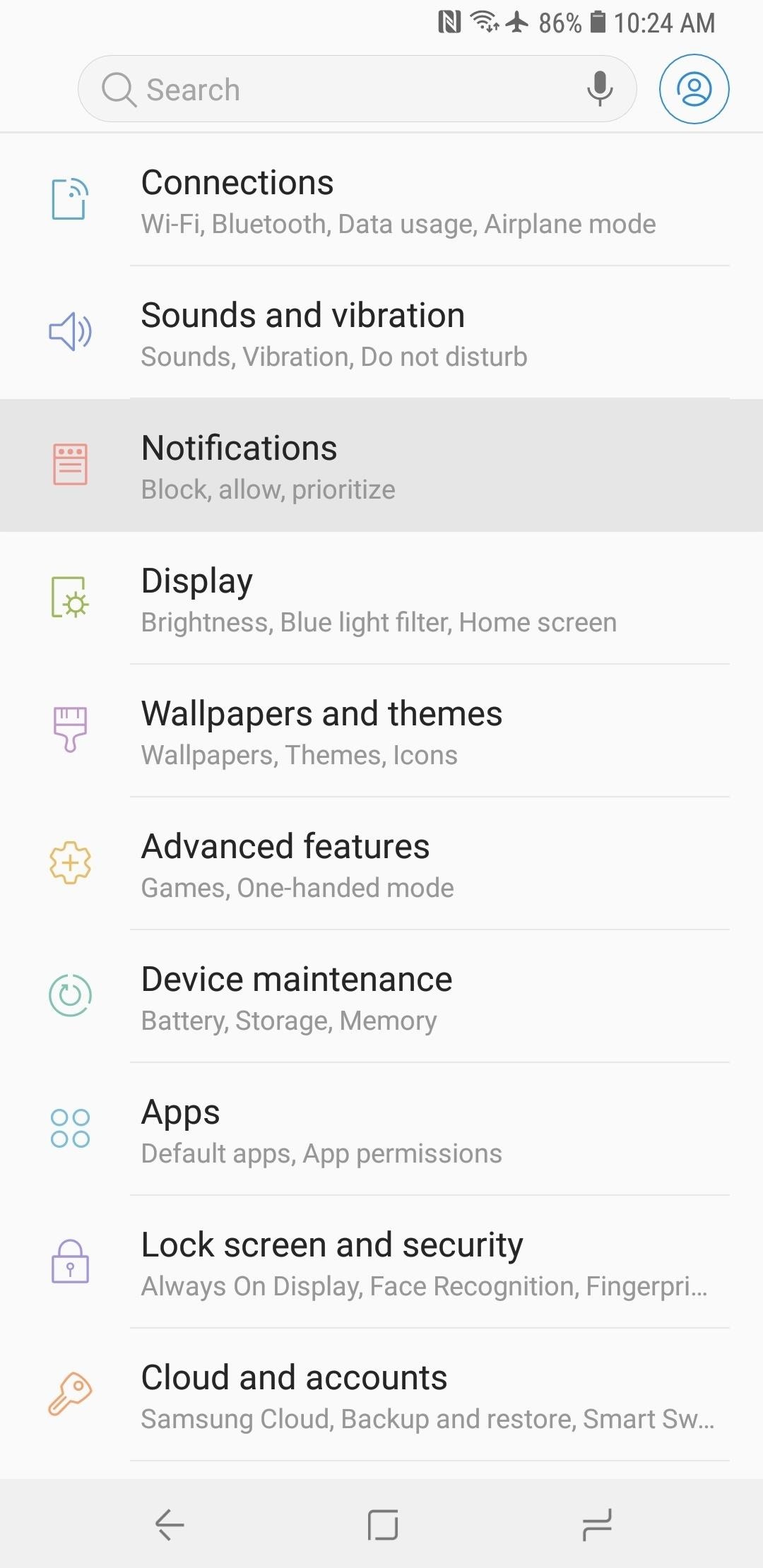
Changing & Removing App Icon BadgesTo begin, open Settings, then tap "Notifications." Locate "App Icon Badges" and disable the switch next to it. Just like that, all of your S9's apps will no longer display an intrusive badge. If you'd like to keep the badges but remove the unread count, tap the words "App Icon Badges" (rather than the toggle), then tap "Show Without Number." Your apps will then display a more subtle badge when notifications are present, but will hide the number of notifications themselves. (1) Before. (2) After. You should note, the above instructions apply to the S9's stock app launcher. Other app launchers, such as Nova, will have different processes for disabling and hiding these badges and counters.Don't Miss: How to Get the New Pixel Launcher From Android P on Any Phone — No Root NeededFollow Gadget Hacks on Facebook, Twitter, YouTube, and Flipboard Follow WonderHowTo on Facebook, Twitter, Pinterest, and Flipboard
Cover image and screenshots by Dallas Thomas/Gadget Hacks


An open source Messenger App Disa is planning to merge every other messenger experience inside one app, so that you can choose 1 app instead of browsing lots of others together. Disa Messenger: This is an open-source messenger app, aimed at uniting every other messengers into one. The app is smooth and user friendly.
How to combine your messaging apps into one - setapp.com


Adaptive Icons is a cool new feature of Android 8.0 Oreo, which styles apps icons in accordance with the system theme or launcher. It will give a consistent look on the phone. Now, you can get Android 8 Oreo's Adaptive Icons feature on any phone runs Android 5.0 Lollipop and up with latest beta version of Nova Launcher (v5.5).
How to Get Android Oreo Adaptive Icons on Any Android Phone


Using the AMOLED screen, the Moto X's Active Display works above the lock screen and awakens only a small portion of the pixels in order to show notifications. Wouldn't it be nice to save battery power and get this on other AMOLED devices like the Samsung Galaxy S4, too?
How to Disable Those Annoying 'Displaying Over Other Apps


News: Android's Best Build.Prop Tweaks for Better Speed, Battery Life, & Customization How To: Bypass Candy Crush Saga's Waiting Period to Get New Lives & Levels Immediately Tell Your Friends: How to Protect Yourself from Android's Biggest Security Flaw in Years
Gadget Hacks Features — Page 16 of 336 « Gadget Hacks


How To: Turn the Screen Off Faster & Alleviate Power Button Stress on Your Samsung Galaxy Note 2 How To: Put Your Galaxy S3's Screen to Sleep Just by Double-Tapping the Display How To: Record Your Sleep Patterns with Samsung Health — No Wearables Needed
How to Power On / Turn on ANY Samsung Phone Without - YouTube


How To: Get Moving Cinemagraph Wallpapers on Your Android's Home Screen How To: Create Personalized GIFs Using Faces on Your iPhone or iPad How To: Turning Video Clips into High-Quality GIFs Is the Easiest Thing Ever with Imgur
How To Make A GIF Without Photoshop - buzzfeednews.com


In iOS 12, Apple's web browser receives a few new features that add up to a better user experience. In the section below, we have created a list of the best new features in iOS 12 Safari. For some background, Apple has begun rolling out the first beta of iOS 12 to developers for testing purposes.
Apple's Safari web browser is getting better with macOS High


Open the 'Text correction' settings menu and disable 'Suggest contact names' and 'Personalized suggestions'. Turning these two settings off is the easiest way to improve Gboard performance on Android, and you should notice that the autocorrect and word suggestions features are much faster.
20 Tips to Help You Master Gboard for Android « Android


Google's Motion Stills addresses one of the biggest issues faced by Apple's Live Photos: stabilization. With the app, instead of jaunty clips you get a smooth video that can be turned into
Apple's Fix Failed: In-App Purchases Still Free with This


Hack Another Computer With Remote Access Using Netbus in Windows 10 Wibisono Indrawan. Most Dangerous Hackertools Sub7,Prorat,Netbus,Raptor.avi - Duration: Nick Hack 4,673 views.
How to hack any computer using netbus - spygirl123.blogspot.com


So you need to charge it. By using a charging dock like this one, you can use it throughout the night as a nightstand clock, providing you with an alarm clock, display alerts and the current time. Right now, you can get this 38mm/42mm Apple Watch charging stand (plus charger) for just over $21.
How to charge an Apple Watch, and how long it takes to fully


We all got a little jealous of the iPhone 7 Plus's dual-lens camera during the Apple Keynote in September. It's okay, you can admit it. But just because your Android doesn't have two lenses doesn't mean you can't recreate the fun bokeh effect of the iPhone's now wildly popular Portrait Mode. The
Best apps for Portrait Mode on any iPhone, iPad or Android

News: Apple Just Released the First iOS 12.1.2 Developer Beta

News: Apple Just Released the First iOS 12.1.2 Developer Beta

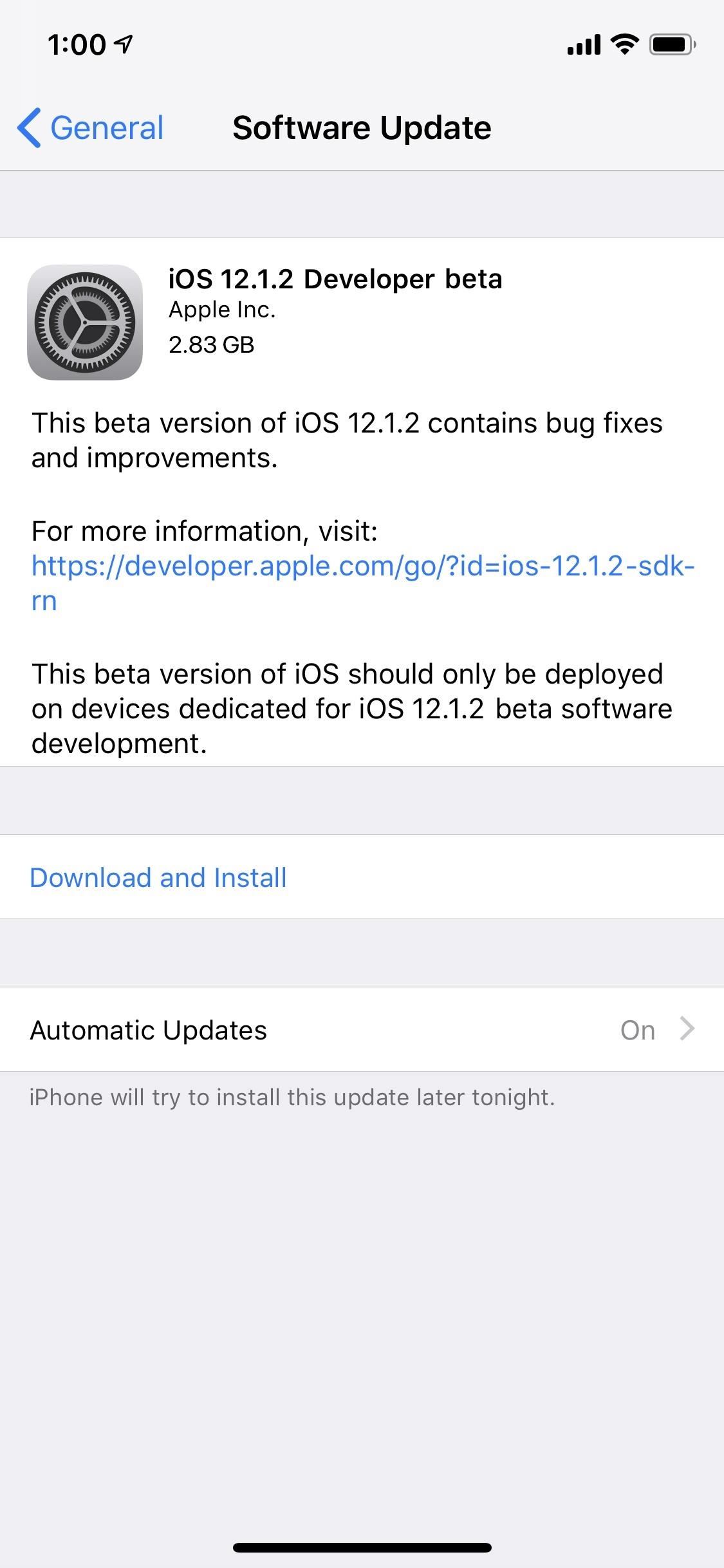
Apple just released the first version of the iOS 12.1.2 beta to developers on Monday, Dec. 10. The update arrives mere days after the Cupertino-based company seeded the official version of iOS 12.1.1 to the public, itself of which had been in beta development since Halloween.Right now, it doesn't seem that the latest beta offers any new features for iPhone users. Instead, developers should expect major and minor bug fixes and security patches. As of right now, Apple only lists two items in its iOS 12.1.2 developer beta 1 release notes, one a known issue and the other a resolved issue.Update: Apple Released iOS 12.1.2 for iPhones One Week After First BetaAccessibility Known IssuesSome user interface elements are inaccessible to VoiceOver in the "Electrocardiogram (ECG)" and "Irregular Heart Rhythm Notification" sections in Health > Health Data > Heart. (46505168) Core Audio Resolved IssuesAudio performance when using some third-party apps is improved on iPad Pro 12.9-inch (3rd generation) and iPad Pro 11-inch models. (46037111)Aside from those things and the various patched security issues and minor bugs that Apple usually doesn't spill the beans on until a stable public release, there's not much to this update.To download and update your iPhone to iOS 12.1.2 dev beta 1, you will first need to be a registered developer with a valid configuration profile. If you have iOS 12's "Automatic Updates" enabled, you can let the software update overnight. To download the beta right now, however, launch the Settings app, select "General," then "Software Update." Tap "Download and Install," then follow the on-screen prompts to download and install iOS 12.1.2 dev beta 1. While iOS 12.1.2 might not include many major changes, iOS 12.1.1 saw the release of a handful of interesting features. A revamped FaceTime UI and FaceTime Live Photos are just two of the changes Apple made to this most recent version of iOS 12, both of which were welcomed by the iOS community.Don't Miss: 4 New iOS 12.1.1 Features for iPhone You Don't Want to MissFollow Gadget Hacks on Pinterest, Reddit, Twitter, YouTube, and Flipboard Sign up for Gadget Hacks' daily newsletter or weekly Android and iOS updates Follow WonderHowTo on Facebook, Twitter, Pinterest, and Flipboard
Cover image and screenshots by Jake Peterson/Gadget Hacks

Google Names BlackBerry PRIV as One of the Most Secure


Add Custom Message for "Respond with Text" In iPhone | Tom's


News : The Latest Razer Phone 2 Leaks Suggest Project Linda Might Actually Happen After the first image leaked of the upcoming successor to the Razer Phone, many were taken aback by its design, specifically how familiar it was.


Whenever you move into a new home, whether that's a house or apartment, changing addresses on all your online accounts is one of the most monotonous tasks that needs to be done. It's even more tedious when you have to update both shipping and billing addresses. But it's necessary, and if you regularly use PayPal,…
PayPal 101 « Smartphones :: Gadget Hacks


Once you add Favorite Doodle you can visit Google.com. If you are already there, you can refresh the page. What you will see is one of the previous Google Doodles being displayed like this one. Selecting a Google Doodle as a Favorite. To change the Doodle to your Google search page, click on the current Doodle.
Replace Google Logo with Your Favorite Doodle in Chrome


In this short post we are going to show you how you can enable Facebook notifications on Chrome - both on Android and on the desktop. You won't need to add extensions, unearth a hidden setting or use a third-party service,
How to Hide Notification Icons on the Windows Taskbar


INSTALLATION 1. INSTALL XAMPP. XAMPP is the most popular PHP development environment.XAMPP is a completely free, easy to install Apache distribution containing MariaDB, PHP, and Perl. The XAMPP open source package has been set up to be incredibly easy to install and to use. XAMPP can be easily installed using the link below.
How to setup Localhost on your Computer using XAMPP
linuxhackr.com/how-to-setup-localhost-on-your-computer-using-xampp/
Installation success, if you want to open XAMPP control panel now check the box(Do you want to start control panel now) and then click finish. After installing XAMPP for Windows. To start the control panel manually, go to C:\xampp >> xampp control panel and double click on xampp-control-panel.exe file. You will get a window that's shows the
XAMPP Tutorial: How to Install and Setup XAMPP for Windows


Learn how to set a navigation destination using voice command on your new BMW. Our BMW Genius from Ferman BMW in Palm Harbor shows you how to simply press a button to activate turn-by-turn
BMW Phone Voice Commands - YouTube


Images via ggpht.com. If you don't like the way that Lux is adjusting, you can teach it to behave a certain way. All you have to do is open the Dashboard and adjust the brightness levels to your desire, hold the link button down, and the app will now use this as its new reference from now on.
Turn On Your Android's Flashlight Using the Power Button


CES 2015: Linx Headbands Can Keep You Safe from Permanent Head Injuries How To: Build a Minecraft Creeper Head Halloween Costume How To: Style a French braided headband in your hair How To: Make a Gamora Guardians of the Galaxy Costume for Only $5
How to Tie a Turban Headband with a Twist in the Front


I would like to start off by making a clear (and what I think is obvious) statement: Instagram isn't like Facebook. Yes, Facebook owns Instagram. Yes, you can share you Instagram photos directly to Facebook. Yes, Instagram will allow you to see which of your Facebook friends are on Instagram.
How to See Previously Liked Posts on Instagram - Lifewire


With a Gmail plugin called Boomerang, you can find out what sent emails are never opened, and you can even keep track of the received emails in your inbox that are awaiting your response using a small Google Apps script.
How to force an email response from someone who is ignoring you


Getting caught using your iPhone at school or work (when you're using it for personal reasons) can be a little bit embarrassing. Even worse, it can be detrimental to how you're perceived by your teacher or boss. But sometimes you just have to beat that next level of Candy Crush, view a risqué photo on Snapchat, or send an important WhatsApp


We knew it was coming, it was just a matter of when. Apple has just announced iOS 11.3, a new update for iPad, iPhone, and iPod touch, and it will include a brand-new set of Animoji for the iPhone X. The animated Animoji, powered by the TrueDepth camera on the iPhone X, have been popular with users
iOS 12.2 New features, improvements and release date
iosjailbreak.org/ios-12-2-new-features-improvements-and-release-date/
Spread the love iOS 12.2 is the latest update about to release in further days. Apple confirmed about its release, and now we have iOS 12.2 beta releases. But still those betas available for developers in the beta program. However, this is good news for iPhone, iPad, and iPod touch users those who are waiting […]
iOS 9 Release Set for Fall with Many New Features & Improvements
osxdaily.com/2015/06/08/ios-9-features-improvements-release-fall/
Bundled with iOS 9 is a new application called "News", which is a bit like a magazine app, and updates live by aggregating articles from many popular news sources, ranging from The New York Times to ESPN. iOS 9 will be available or developers now, a public beta will be available starting in July, and released to the general public in the fall.
iOS 13: Release Date, Beta, New Features and More


Images captured by Microsoft's next generation Kinect depth-sensing camera that will facilitate augmented reality experiences in the next version of the HoloLens and give computer vision to untold multitudes of connected devices in enterprise facilities, have made their way into the wild.
7 Amazing Microsoft Kinect Hacks -- Redmondmag.com

How To: Delete an old Yahoo account

How To: Delete an old Yahoo account
Learn how to delete your old Yahoo account from this video in simple steps. First open your web browser on your computer and go to the Yahoo home page. Now sign into your account using your username and password. Now copy and paste this link "http://edit.yahoo.com/config/ delete_user" in your address bar. Enter your password to confirm the deletion of your account. Finally enter the code to confirm and delete your account. Please enable JavaScript to watch this video.


How to Add a Link to Your Instagram Story. I used HubSpot's official Instagram account for these instructions, since my personal account isn't verified (I also, you'll be surprised to hear, don't have 10,000 followers … ). 1. Take a photo or upload one to your Instagram Story, and then click the icon at the top right that looks like a chain.
Instagram How To: Add A Link To Instagram Story - YouTube


Hope you liked this little demo! Get 10% off your first purchase at Sophie and Toffee:

In this tutorial, I'll show you my top picks for Android equalizers, mods, and apps. I included both root and non-root options, so no matter which device you have, you'll find something to meet
How to Get Even Better Sound Quality Out of Your HTC One's


Making a Vinegar Battery Vinegar also makes a good electrolyte, because it contains acetic acid. You can use copper for the anode, but zinc makes a better cathode than aluminum; if you don't have a zinc strip, use a galvanized nail, which is coated with zinc.
How to Make a vinegar battery « Hacks, Mods & Circuitry


Standout features include: • All Pixel Launcher features: swipe up from your dock to reveal the new full screen All Apps mode, tint the dock, use the new circular folder style, place the Google Pill and Date widgets and more. Enabled by default, and available for free!
Action launcher update brings essential phone support, adds


We have covered how to share files over Bluetooth on Windows Phone 8.1, but here we'll take a closer look at sharing files with Windows 10 and some troubleshooting steps, too. Enable and Use
How to Use Bluetooth connectivity to share cell phone files

How to Delete / Remove Unwanted Facebook Applications


Here's a creepy weekend project! Take an old analog rotary phone (which you can easily find in an antique or vintage store). Unscrew the earpiece and then alter the parts according to the tutorial so you can start 'talking to ghosts'.
How to Dismantle a Rotary Diesel Pump - WonderHowTo


The Nokia 9 PureView could be the right smartphone for shutterbugs, but there are better options for everyone else. Google Pixel 3 XL. Nokia's flagship is the way to go if you want the
Nokia 9 PureView review: Page 2 | TechRadar


Select "Google Photos" and select the albums you'd like to download. Now you can download all the media as a ZIP file without having to tediously select each individual image in the Google Photos gallery. Make Google Drive and Photos Work Together Inter-app compatibility is a major issue when it comes to different cloud applications.
Google Photos' latest update lets you hide your most


In my video below, I'll be showing you how to make a simple, but powerful pen gun pretty much anywhere you want and with very little effort. You can make this at home, in class, or at the office in no time.
Most Powerful Pen Gun: 5 Steps - How to make anything

How To: 20 Surefire Ways to Boost Battery Life on Your iPhone

How To: 20 Surefire Ways to Boost Battery Life on Your iPhone
If your iPhone can't last a full day without being recharged multiple times, something's wrong—but it might just be working harder than it needs to.So before you take a trip down to the Genius Bar, try some of the tricks out first to conserve your battery power throughout the day. Some of these battery-saving tips could work on older iOS versions, but this guide is geared specifically for iPads, iPhones, and iPod touches running iOS 9.Don't Miss: The Coolest New iOS 9 Features You Didn't Know About
Note: For the majority of these settings, you can use iOS 9's new Settings search feature to find the feature in question.

1. Monitor Your Battery to Identify Problem AppsWithin the Battery preferences inside the Settings app, you can monitor which apps are draining your battery most, then decide whether or not to uninstall them—or at least force-close them.If your home screen is the biggest battery hog, like mine is, enable Auto-Lock to automatically lock your device after 1 minute or 30 seconds, as opposed to 2-5 minutes or never. (Suggestions like this don't always appear on the Battery page, unless you have issues that need addressed.)

2. Turn Off Background App RefreshAnother way to keep apps from draining unnecessary power is by going to Settings -> General and disabling Background App Refresh, either for all of your apps or individual ones. This stops your device from constantly refreshing app content in the background, as opposed to refreshing it once you open the app. (This is also a great tool when traveling with limited data.)

3. Disable Auto-BrightnessUnless you're too lazy to adjust it yourself, turn off Auto-Brightness in the Display & Brightness settings. More often than not, my display's brightness is higher than needed when this feature is on, so I adjust it manually most of the time to keep it from draining my battery.

4. Disable Bluetooth, Wi-Fi, & AirDrop When You Don't ThemYou can save significant battery life just by pulling up your Control Center and making a few quick adjustments. For instance, if you're not using Wi-Fi or Bluetooth, then turn those things off. If Bluetooth needs to remain on, then turn off AirDrop (which will also prevent cyberflashing).

5. Disable Notifications for Certain AppsNot every notification you receive is important or useful. Aside from the essentials, like email and messages, toggle off the app notifications you don't need. Just go to Settings -> Notifications and disable notifications for individual apps one by one.

6. Set Your Device to Fetch Data Less FrequentlyAlthough you still want to keep email notifications enabled, you can limit how frequently your device fetches new data from within the Mail, Contacts, Calendars preferences. Just select Fetch New Data, toggle off Push, and select how frequently new data is fetched (every 15 minutes, 30 minutes, hourly, or manually).

7. Disable HandoffDisable the Handoff feature, located inside of Settings -> General -> Handoff & Suggested Apps. When enabled, you can start a task on one device (an iPad, iPhone, or Mac), then hand it off and finish it on another—but how many of you actually use it, or would use it? I have a Mac and have never found it useful, and there's a good chance you feel the same way.

8. Disable Suggested Apps for Lock Screen & App SwitcherAlso within the Handoff & Suggested Apps preferences is a Suggested Apps toggle, which suggests apps based off regular activity and location. You may have noticed this on your lock screen or within your device's app switcher, but if you're not using it, do yourself the favor and toggle it off.

9. Disable App Store UpdatesWithin the App and iTunes Store preferences, turn off Automatic Updates. This will halt background processes by the App Store as it monitors updates from the installed apps on your device.

10. Disable Fitness Tracking (If You're Not Trying to Get in Shape)The Health app tracks motion and fitness by accessing sensor data like body movement and step count, but if you don't use it, turn it off. There's no reason to have your device track your fitness if you're not trying to get in shape. Go to Settings -> Privacy -> Motion & Fitness to toggle off Fitness Tracking—either for the Health app itself or for all apps.

11. Limit Ad Tracking on Your DeviceAlso within the Privacy settings is Advertising. What you want to do here is toggle on Limit Ad Tracking. This will limit how often your device is tracked and supplied with targeted ads by advertisers.

12. Disable Location Services for Certain AppsThe Location Services preferences within the Privacy settings are also worth looking at when trying to extend battery life. If you want, disable it completely, but what I tend to do is adjust it on a per-app basis. For instance, I can allow Instagram to only access my location when I'm within the app in order for me to tag a location.

13. Toggle Off Frequent LocationsDigging deeper into the Location Services preferences, head into System Services a the bottom of the page. Here you'll find additional toggles that can be turned off, like Homekit, Compass Calibration, and Location-Based iAds. You can also turn off Frequent Locations, which allows your iPhone to track where you go in order to provide "location-related information."

14. Don't Send Data to AppleLastly, before leaving the Privacy preferences, go into Diagnostics & Usage. Although sending data to Apple contributes to development and makes iOS a better experience for everyone, I like to think that there are enough iPhone users that have this feature enabled, so I opt to save battery instead.

15. Disable Certain iCloud PreferencesWithin the iCloud settings, go ahead and toggle off everything you don't need or use. Things like email and reminders don't necessarily need to be toggled on and stored in the cloud. This should only be done if you pretty much only use one Apple device.

16. Reduce MotionThe parallax effect is a nice little touch that's been around since iOS 7, but it's not necessary (and sometimes even annoying). Turn it off from within Settings -> General -> Accessibility -> Reduce Motion and you'll notice that your device feels faster without animations when launching apps.

17. Toggle Off Siri Suggestions & Search ResultsWhenever you do a search of your device, Siri will suggest apps that it thinks are relevant to your search—before you even begin typing. This can take some processing power, and therefore battery power. If you don't need it, go to General -> Spotlight Search -> and toggle off Siri Suggestions. You can also toggle of apps that Spotlight peruses through whenever you perform a search. (More info on search settings here.)

18. Turn Wi-Fi Assist OnNew to iOS is Wi-Fi Assist, which is found in the Cellular preferences. Using this will prevent your device from attempting to connect to a weak Wi-Fi network when a cellular connection is stronger and a better option. It's small but useful in some instances, but can be a bigger battery drain without it if your device is constantly trying to use a weak Wi-Fi hotspot.

19. Enable Low Power Mode When NeededAlthough Low Power Mode may slow your device down to the speed of an iPhone 5, when you're getting really low and desperate for battery life, toggle this on to extend it by as much as three hours. For more on this, check out our Low Power Mode guide.

20. Keep It Face DownIn an effort to help save battery, Apple has included a face-down detection feature within iOS 9 that prevents the screen from lighting up when your device receives a notification when it's screen-side down. So when you're working and not concerned with notifications, set your iPhone with its display down from now on. What do you do to extend battery life on your iPad, iPhone, or iPod touch? Share your tips with us in the comment section below.Follow Apple Hacks over on Facebook and Twitter, or Gadget Hacks over on Facebook, Google+, and Twitter, for more Apple tips.

Boost Performance and Reduce Lag-Delays on Your - DroidViews


Hey all, Anyone know how I can stop my stock G2 from turning volume down when I have my 3.5mm plug in? It assumes I'm listening to headphones, so if I have the volume set anywhere within 4 steps of max, it will turn it down to 5 below max every few minutes, warning me about excessive headphone volume.
Disable Bang and Olufsen Audio control - HP Support Forum


Type in iphone wallpapers and tap Go. Doing so will bring up a list of popular wallpapers for iPhones and iPods. Searching for "iphone wallpapers" rather than "ipod wallpapers" will typically result in higher-quality photos. You can vary your search by adding "hd" or other keywords related to the content you'd like to see (e.g., "mountains").
how to get wallpapers on iphone/ipod touch - YouTube


How To: Android's Built-In Scanner Only Catches 15% of Malicious Apps—Protect Yourself with One of These Better Alternatives News : eBay Vulnerability Allows Scammers to Attack Android & iOS with Malicious Programs
How to Sync Your Android Text Messages and Phone Calls with


On Android Smartphone, every app running in the background always use Internet data without your permission. If you're on an unlimited data plan, then there is no problem because you don't have any restriction of data, but if you have limited data usage plan, your data will be wasted due to Background Data usage.
How to block ads on your Android | AndroidPIT


We wanted to find out the secret behind her ability to curate Instagram for a beautiful, engaging, and flawless feed. Read on for her tips on how to improve Instagram for a stronger social strategy. You currently have over 53,000 Instagram followers.
How To Fix Your Instagram Explore Feed Algorithm


A convenient feature built into the BlackBerry KEYone keyboard is the ability to set custom key shortcuts from the home screen. You're able to assign two distinct shortcuts for every letter key — for long presses and short presses. Keyboard shortcuts can be used for so many functions: set a key to
How to Remove On-Screen Keyboard From Desktop | It Still Works


On Firefox, you can install an addon called BlockSite to block website. Install the addon, press ctrl+shift+a, and click Extensions on the left. Now click Options under BlockSite. In the pop-up

How to Uninstall Cydia Apps Directly from SpringBoard


NXT-ID's Wocket Smart Wallet Named Number One Best Tech Gift for 2015 by Rethink Modern It's designed to replace your entire wallet with one single card. Then it uses some pretty cool high
Smart credit cards are coming. Here's what you need to know


The new Windows 8 Metro Apps (or Modern UI, or Windows 8 Tablet Style Apps, or whatever you want to call them) are sleek and quick, but unfortunately there's not an obvious way to completely close out of them.
Why you should stop closing apps to save battery life - CNET


News: Here's What an iPhone X-Inspired SE 2 Could Look Like News: Lack of Resources Could Force Apple to Delay the iPhone SE 2 News: The iPhone 7 Just Became the Spiritual Successor to the iPhone SE News: It's Official — New iPhone 8 Coming September 12
Here's What the iPhone XI Could Look Like Without a Camera


Attention Samsung Galaxy Users: Your phone has a big security flaw Samsung readies fix for a security flaw that may have compromised as many as 600 million phones, including the Galaxy.
13 Ways on How To Find Hidden Spyware on Android Smartphone

News: Turn a Vacation into a Treasure Hunt with Just Your Phone

News: Turn a Vacation into a Treasure Hunt with Just Your Phone

It feels strange to be walking through an open field in a small village in the English countryside. There's no one else around — just the four of us: me, my husband, my 12-year-old son, and my adult niece. The day is spectacular, particularly for England. The sun is shining, and the temperature is in the low '70s.After a breakfast of tea and scones on board the canal boat we've rented for a week, we set out on foot this morning to explore the area beside the Oxford canal. After filling our backpacks with things we might need (water, some snacks, a pen, and of course, our phones), we don our baseballs caps, tie up our sneakers, and off we go.As we wind our way through the field, a handmade wooden sign points the way to the walking path, which makes its way through an isolated farm. We're on vacation, and we're doing what we love to do: geocaching. After walking through a desolate field in England, the coordinates led us to a small stone church. Image by Patti Woods/Gadget Hacks Instead of visiting museums or shopping, we've charged up our phones and are spending the day exploring areas we would never normally find. That's the beauty of geocaching — you'll discover parks, monuments, trails, buildings, and towns that the locals know about but the guidebooks don't.Today, we're headed to a centuries-old church to find a medium-sized cache, something about the size of a small shoebox. We all have iPhones (my husband has a 7, my niece and I each have a 6S, and my son has an SE.) The app we use, Geocaching (Android | iOS), gives us the coordinates of where we need to go, a description of the cache (its size, any pertinent information), and optional hints to help us find it.We walk for about a half mile; the lonely belltower stands out against the blue sky. Coming up to the church, we walk into the yard through a gate in the old iron fence. Centuries-old tombstones surround the little church which, unfortunately, is closed today. We would've loved to have seen the stained glass windows from the inside.No matter, though. We have a cache to find.The GPS leads us to within 20 feet of where it is hidden. Now it's up to us to find out exactly where. It gets quiet as we stop talking and start concentrating on finding anything that looks unusual. My son turns over rocks while my niece looks up and under the fence. I find a long stick and use it to brush aside leaves that have clumped in piles around the grass. My husband walks alongside the church, running his hand against the stone wall. At one point, he bumps up against a stone that isn't flush with the rest. He jiggles it, then slides it out. "Found it!" he shouts.As he pulls out the loose stone, a plastic box is revealed. My niece gets a pen so we can sign the log. My son runs over to see what's inside. There's a shamrock keychain, a mini rubber chicken, and a smiley face magnet. He trades some American coins for the chicken, and my husband marks the cache as "found" in the app. At the church in England, we found the cache hidden in the wall. Image by Patti Woods/Gadget Hacks Enthusiasts describe geocaching as the world's largest treasure hunt. Surrounding you at this very moment — no matter which state, country, or continent you're in — there are hidden containers, called caches, just waiting to be found. There are 3.1 million active geocaches in the world. Some are tiny (these are called "micros") at just a few millimeters in size. Others are big, large enough to walk through. No matter the size, they all have one thing in common: a log that you sign when you find it. The micros only contain a tightly scrolled piece of paper that requires nimble fingers to unroll. The larger caches contain notebooks and pencils along with toys or trinkets called "geoswag."Compared: The Best International Data Plans from All Major US CarriersAll of this excitement wouldn't be possible without the technology of GPS. It's hard to remember what life was like before GPS now that it's available at our fingertips through our cars and phones. But before 2000, the US military kept GPS close to the vest by intentionally degrading the signal to discourage civilian use. However, things changed in May 2000 when the government ended this "Selective Availability" and essentially made GPS a public commodity. At the time, no one could have guessed that this availability would lead to a game of global treasure hunt.However, some forward-thinking people decided to test out the new navigational tools by placing objects in the woods and listing the coordinates on the internet. In September of that year, three friends founded the company Groundspeak Inc. (doing business as Geocaching HQ).Travel writer Selena Hoy, who has been an avid geocacher since 2008, remembers her first geocaching trip, in Guam, using a GPS device. "Back then, you couldn't do it on your phone," she said. "It was totally different. You had to choose which caches you wanted, plan out a route, input coordinates into your GPS … it was a much more intentional activity."Chris Ronan, Community Relations Manager for Geocaching HQ and active cacher himself who has found caches in all 50 states and 14 countries, explained that, initially, GPS devices could be quite expensive, thus limiting the number of people who participated.
As GPS use and smartphone ownership expanded, the hobby took off, and cache numbers began to grow exponentially. In the first week of the launch of the Geocaching app, there were 75 caches listed. In 2018, there were 71,602,898 worldwide "Found It" logs posted on Geocaching.com, and enthusiasts attended more than 43,000 geocaching events worldwide.I didn't discover geocaching until 2010 when I came across an article in a parenting magazine. When a friend mentioned trying it with her kids, I knew I had to check it out. I downloaded the Geocaching app to my phone and was surprised to find there were about a dozen caches in my town. Having GPS built into my phone made it easy to dive into the hobby.Don't Miss: Ease Travel Annoyances with Our Smartphone Tips & ShortcutsDue to the creation of apps and the widespread addition of GPS to smartphones, geocaching is an affordable, easily accessible hobby. The most popular app, Geocaching, by Groundspeak, is available for Android and iOS with both free and premium paid versions. With the paid version ($9.99 for three months or $29.99 for one year), you can find Premium Member-Only caches, use offline maps, make lists, and award favorite points to the best caches.A similar app, Cachly, is only available for iOS and has a one-time fee of $4.99. With this app, you can save caches to offline lists, translate hints and logs from any language, and choose from different map types. Either app will tell you which caches are near you and navigate you to them.As one might expect, the geocaching community is huge and online forums are a great place to get information, share stories, and ask questions. Beginners would do well to start off by reading through the Geocaching website, where you'll learn how to navigate to a cache and what to do when you find it. On the Geocaching forum, topics range from places to go to technology talk. Beginners can find help, and seasoned cachers can discuss their finds. Of course, Reddit's Geocaching forum hosts all sorts of discussions and a lot of pictures, and there are countless YouTube videos from cachers around the world. When the weather doesn't cooperate, it's easy to become an armchair geocacher and read or watch all about other people's travels.Naturally, there are certain rules to follow when caching. You should always procure permission from the landowner before placing a cache, so seekers should never be on private property unless it specifically says so in the description. Local laws apply, of course, and seekers need to follow common sense. If the terrain feels dangerous or uncomfortable, it's best to move on to another cache. It's particularly important to be aware of your surroundings while caching on vacation. The last thing you want is to get lost. You never know what you'll find when geocaching. In Vermont, we found ourselves hiking through a farm that led to a stone Christmas tree. Image by Patti Woods/Gadget Hacks As with any new hobby, there's bound to be a learning curve in the beginning. Our first few attempts had us walking in circles, tromping through muddy paths and trying to look inconspicuous in public places.One cache, located in a grocery store parking lot, was frustrating to us as newbies. After looking high and low for nearly half an hour, my son was getting tired and cranky. We were about to log it as a "DNF" (Did Not Find) when I thought to push on a metal electrical cover plate. It turned out to be a decoy and the cache was hidden inside. Now, with over 400 caches under our belts, we have a better idea of what to look for when searching. It just takes a little practice to train your eye to look for things that seem out of place.Susie Henderson, her husband (a high school geography teacher), and their two sons, now aged 10 and 8, first tried geocaching while camping in Vancouver Island. The Parks Canada Visitors Centre on Wickaninnish Beach rented out GPS devices free of charge. "I wouldn't say it was an overwhelming success," she said. "We tried searching for the first geocache, which was pretty close to the visitor center, to no avail. We ended up going round and round in circles and couldn't find it anywhere." She didn't let that deter them, though. Since then, they've geocached on other vacations, and her husband has taken his students geocaching. (1) Geocaching is fun for all ages. Here, my son was excited to find a tiny pack of UNO cards in a cache. (2) My son's most memorable find — his first Pokémon card. Images by Patti Woods/Gadget Hacks If you want to plan a geocaching vacation, you have a lot of options. You can do it in cities, in the country, even scuba diving or climbing mountains. For my 40th birthday, we planned a geocaching trip to New York City where we zig-zagged up and down Manhattan looking for mostly micro caches. Every Thanksgiving when we travel to Maine to visit family, we build in extra travel time so we can stop along the way to find caches. We've found caches in all the New England states and as far west as Arizona. Of course, we don't hold a candle to others who have traveled around the world looking for treasures.Matthew Gillard, who hails from England but is currently living in Bahrain, has cached in 15 countries. "Geocaching has taken me to some amazing places on holiday that I wouldn't have visited if a cache wasn't there," he said. Gillard currently uses a Garmin 62 Map and a Galaxy Note 5. "In India, we discovered an amazing historic fort which we would have missed. Whilst caching in Australia, we discovered some beautiful places with amazing geology. In France, we discovered a really old chapel in the middle of nowhere only because a cache was nearby."Read Next: Vacationing for the 'Gram — How Instagram Is Changing Hotels & RestaurantsAnd, he notes, there's an added bonus to discovering a cache. "The written logs left behind by other cachers can act like a mini travel guide." For example, a recommendation for a restaurant logged in a cache in Chiangmai, Thailand, resulted in the best meal he'd ever had on holiday.My family and I had a similar experience. One geocache log in England, hidden in an old-fashioned red telephone booth, had an entry which recommended a nearby pub. We took the suggestion and had dinner there that night.Hoy agrees that geocaching is a great activity to incorporate into vacations. "Geocaches are often placed by locals who know a lot about the history and significance of local monuments, far more than what you would find in a guide book or travel article. I love that geocaching shows me unexpected small and beautiful places, that it connects me with locals, and I love the CITO ethos of geocaching, which means 'Cache In, Trash Out,' with the aim to leave a place always cleaner and better than we found it."It's also important to check the terrain of a cache, as Gillard reports. While in Thailand, he got up early one morning while everyone slept and went to find a cache. He had to climb up an 80-foot rock face, which he said was easy. "Getting down, however, proved to be more difficult, as I was wearing flip-flops and couldn't see where I was placing my feet. I genuinely thought that I might fall off onto the rocks below," he said. Fortunately, he arrived back without incident, but there are always safety concerns to consider. Whether dealing with muddy trails or side-of-the-road guardrail caches, it's important to be aware of your surroundings and take precautions. It's not a bad idea to take along a small first aid kit, along with water, sunscreen, bug spray, and snacks.Don't Miss: Best Navigation Apps — Google Maps vs. Apple Maps vs. Waze vs. MapQuestPaul Frizzell from Illinois has an astonishing 22,731 finds under his belt, all found in the US (he's found caches in all 50 states) and three Canadian provinces. He often travels with several different GPS options. He currently favors a Garmin Oregon 450 GPS and an iPhone 5S. The self-described "geography and map nut" said two of his most memorable and adventurous finds were the first caches placed in both Hawaii and Alaska. "Hawaii involved bushwhacking through a jungle, hiking back to the car in the dark, and dealing with wild pigs," he said. "Alaska had almost continuous rain, bears, and a very unexpected encounter with fellow finders."Not every cache has to be so adventurous. Guard rail caches are very popular and are just what they sound like — caches hidden on the side of the road in the guard rail. You can find magnetic micros on the back of street signs. They aren't the most exciting caches, but then other times, you'll find a cache where the container is unusual, like a piano in the middle of the woods, a hollowed out book on a library bookshelf, or a birdhouse hanging in a tree.One of the best containers that frequent traveler Megan Mertz found was a beer stein hidden along a wall in Passau, Germany. She and her husband Jonathan geocache all over the world. They initially used a Garmin eTrex, but now rely solely on their Samsung Galaxy S7 and S9. Other times containers can be very tricky and can look like rocks, bolts, logs, pinecones, or even hollowed out golf balls
Some people don't care about the contents of the cache; they're just in it to claim another find. But others, especially children, like the excitement of seeing what's in the box. Geoswag can include buttons, magnets, keychains, and plastic animals. A big complaint among cachers, however, is when the boxes get filled with junk — random plastic "toys" that no one would want and things that get rusty or waterlogged. But often, the contents can be exciting. Some cachers have wooden nickels made with their team names on them and these become collectibles. My son was thrilled to find his first Pokémon card in a cache. Another time, a crisp one dollar bill made for a true treasure.At a rest stop in New Hampshire, we found a cache with a trackable — a keychain or a coin with a code on it that is meant to be moved from cache to cache so participants can watch its progress around the world. My son wanted to keep it (in this case, it was a dog tag), but we explained that we had to move it to another cache for someone else to find. We then were able to track its progress across the country on Geocaching.com.
When we first started geocaching, my son was five years old. He was easily impressed when we found a box hidden under a pile of rocks in the woods, and he loved picking out a trinket to add to his collection. Now he's 12, and his focus has shifted to managing the technology and leading the way on our adventures. In England, he directed us to a geocache hidden in a community garden and another in a college courtyard in Oxford.We would never have seen these beautiful places if we hadn't been geocaching. Through our experiences, we've learned that it's easy to go on vacation with a plan and a guidebook in hand, but it's even more exciting and spontaneous to build a holiday around geocaching. With a phone, an app, and a sense of adventure, geocaching can take you to places that only the locals know. This summer, we'll explore Rhode Island and Florida, and perhaps we'll get a chance to find some caches in Canada. In the end, though, it doesn't matter where we go or what we find; caching ensures that we'll get off the beaten path and we'll have spontaneous adventures with the people we love.This article was produced during Gadget Hacks' special coverage on traveling with your smartphone. Check out the whole Travel series.Read Next: The 5 Best Travel-Friendly Phones for Road Warriors, Vacationers & Business FlyersFollow Gadget Hacks on Pinterest, Reddit, Twitter, YouTube, and Flipboard Sign up for Gadget Hacks' daily newsletter or weekly Android and iOS updates Follow WonderHowTo on Facebook, Twitter, Pinterest, and Flipboard
Cover photo by Justin Meyers/Gadget Hacks


Turn a Vacation into a Treasure Hunt with Just Your Phone It feels strange to be walking through an open field in a small village in the English countryside. There's…
Turn a Vacation into a Treasure Hunt with Just Your Phone


Christmas Scavenger Hunt Ideas. A Christmas scavenger hunt is a fun holiday idea for any event from office parties to family gatherings. Whether you are sending someone on a search for their Christmas gift or a treasure hunt around the neighborhood, scavenger hunts can add excitement to all your festivities.
Vacation Vacation Photo Scavenger Hunt Ideas - Mommysavers


How to turn your road trip into the ultimate scavenger hunt Selfie stick and other tech gadgets you should pack for your next vacation. Road trip scavenger hunt items: Footwear News BGR
Solitaire Treasure Hunt - Home | Facebook


Your photos will tell the story of the places you visited, things you experienced and places you saw. You can even turn it into a game by having your own vacation photo scavenger hunt. Here are some tips and ideas to get you started: Family Vacation Travel Photography Tips. Don't just stand in front of things.
How to turn your road trip into the ultimate scavenger hunt


Dive deep into a world of match-3 adventure and play hundreds of hand-crafted levels. Defeat the challenges and you will be richly rewarded, and with your newfound wealth, you can rescue a once great reef and turn it into your own personal underwater paradise.


Cohasset and Hingham parents have a wealth of choices to get kids outdoors and connected to the natural world. Show your kids that there is more to nature than just the beach! Some of the best: • Quests: Quests turn a walk on an outdoor trail into a treasure hunt. They last about an hour.
Donations turn into teachers' treasures at supply swap | WGN-TV


It feels strange to be walking through an open field in a small village in the English countryside. There's no one else around — just the four of us: me, my husband, my 12-year-old son, and my adult niece.
Turn a Vacation into a Treasure Hunt with Just Your Phone

Turn a Vacation into a Treasure Hunt with Just Your Phone


It feels strange to be walking through an open field in a small village in the English countryside. There's no one else around — just the four of us: me, my husband, my 12-year-old son, and my adult niece.
Turn a Vacation into a Treasure Hunt with Just Your Phone


Turn a Vacation into a Treasure Hunt with Just Your Phone By admin On 4 aprile 2019 · It feels strange to be walking through an open field in a small village in the English countryside.
Prying them away from their screens: why kids need time in


Donations turn into teachers' treasures at supply swap Chicago teachers took part in a treasure hunt Friday in a warehouse packed with every school supply imaginable. buy $2,000 to
Christmas Scavenger Hunt Ideas